Turning your photo into a cartoon is surprisingly easy these days. It really is as simple as uploading a picture and picking a style you like. With modern AI tools like AnimePhoto.ai, all the heavy lifting is done in seconds. You get a cool, share-worthy image without ever opening up design software or needing an ounce of artistic skill.
Your Guide to Instant Photo-to-Cartoon Magic
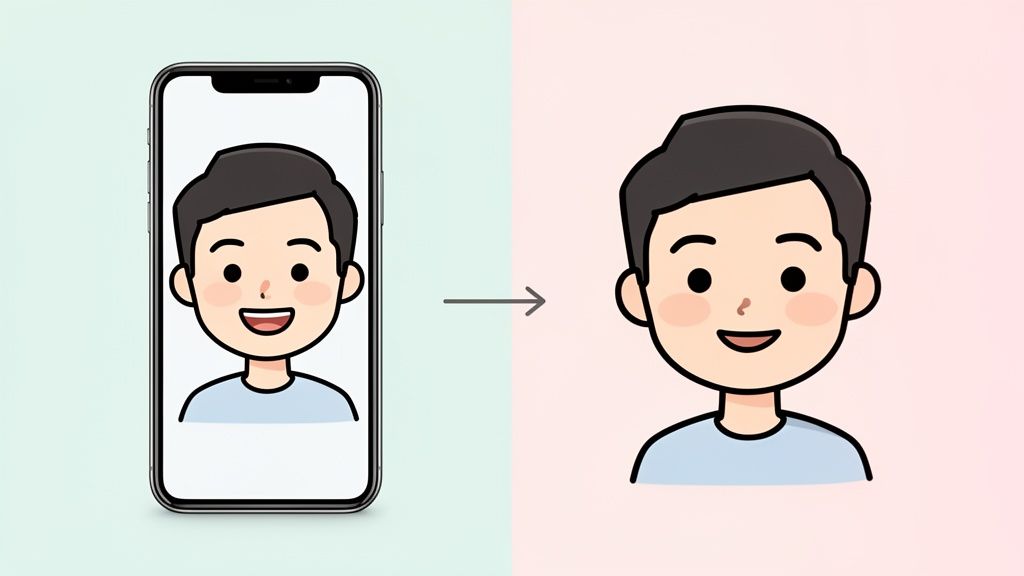
Long gone are the days when you needed to be a Photoshop pro to cartoonify yourself. Now, anyone can do it using incredibly powerful and easy-to-use AI tools. We're not just talking about a basic filter that slaps some lines over your picture; this is a genuine artistic transformation. The technology actually studies the key features in your photo and completely redraws them in a new style.
Think of this guide as your starting point. We'll walk through how to get amazing results, whether you want a new social media avatar, a one-of-a-kind gift, or are just looking to have some fun.
What Makes AI Cartoon Generators Different
So, what’s the big deal with these AI tools? Unlike traditional editing software where you have to make every little adjustment yourself, these generators automate the whole creative process. This opens up a world of possibilities for everyone, no matter their tech skills.
- It’s Fast and Simple: The entire process is just a few clicks. Upload a photo, pick a style, and boom—the AI hands you a cartoon version in moments.
- Tons of Artistic Variety: You can instantly jump between totally different aesthetics. Go from a cute chibi look to a gritty cyberpunk theme with a single click. Doing that by hand would take an artist hours.
- Dependable Quality: The AI has been trained on massive libraries of art, so it knows how to produce a polished, professional-looking image every single time.
The real magic here is that it makes art accessible. You don't need to know about color theory or line work to get something that looks fantastic. The AI does the hard work, so you can just focus on the fun part—finding a style that fits you.
This new approach means creating a standout cartoon avatar or personalized art isn't just for a select few anymore. Armed with the right photo and a little imagination, you can make something truly special. Next up, let's get into how to prep your photo and choose the perfect cartoon style to bring your idea to life.
Getting Your Photo Ready for the Best Cartoon Look
The real secret to a jaw-dropping cartoon transformation doesn't lie in the AI itself—it's all about the photo you start with. Think of it like this: you can't expect a masterpiece if you start with a blurry, dark, or chaotic canvas. Giving the AI a clean, high-quality image is the single most important thing you can do to get a result you'll love.
AI models are incredibly powerful, but they aren't mind-readers. They interpret what they literally see. If your photo is poorly lit or has a distracting background, the technology can get confused, leading to muddy colors or weirdly distorted features. You want to hand it a picture with clear, simple information.
Start with a Clear Subject
First things first: your subject needs to be front and center. If you're turning yourself into a cartoon, your face has to be the undeniable star of the show.
- Face Forward: A straight-on portrait is usually your best bet, especially if you're making a new avatar. When you're looking directly at the camera, the AI can easily map your eyes, nose, and mouth without weird angles getting in the way.
- Clear the Way: Anything that covers up your face is a potential problem. Heavy shadows, hair falling across your eyes, or even a hand resting on your chin can throw the AI off. A good tip is to just push your hair back and make sure you're facing a light source.
- Keep It Simple: While a full-body shot might seem like a cool idea, a simple headshot or a photo from the chest up almost always gives you a more detailed and accurate cartoon. The less clutter the AI has to process, the more it can focus on getting your face just right.
You'll notice the upload interface on AnimePhoto.ai is designed to be super simple, prompting you to focus on just one, great photo. That's intentional.
This clean design reinforces the idea that picking that one perfect shot is the key to an amazing result.
Master Your Lighting and Background
Don't underestimate the power of good lighting and a simple background. These two elements can completely make or break your final image because they directly influence the colors and lines the AI generates.
A simple, uncluttered background is always the right move. A busy scene with other people, complex patterns, or a ton of objects can distract the AI. Sometimes, it even tries to blend parts of the background into your portrait, which is rarely a good look. A plain wall or a softly blurred outdoor scene is perfect.
Pro Tip: You don't need a fancy studio setup. Just stand facing a window on an overcast day. This gives you soft, even light that gets rid of harsh shadows and instantly makes your photo look better. If you want to dive deeper, you can learn more about the best lighting for portrait photography.
By taking a moment to choose a photo with a clear subject, great light, and a clean background, you’re setting the stage for the AI to do its best work. The result will be a vibrant, clean, and accurate cartoon that you’ll actually be excited to show off.
Choosing Your Signature Style: From Chibi to Cyberpunk
Now for the fun part. With your photo prepped and ready to go, it's time to decide what kind of masterpiece you want to create. This is where you really get to inject personality into your image, turning a standard picture into something unique with a single click.
Think about what you're trying to achieve. Is this a new, playful avatar for your gaming profile? A dramatic portrait to make your social media feed pop? Or maybe a one-of-a-kind gift for a friend? Every style carries a different vibe, so the trick is to play around and see what clicks with both the original photo and your own creative vision.
Finding Your Perfect Artistic Match
Diving into all the different art styles can feel a bit like being a kid in a candy store. From the adorable, super-deformed look of chibi to the gritty, neon-soaked world of cyberpunk, each option tells a completely different story. You’re not just slapping a filter on your photo; you’re picking an entire aesthetic that will redefine it.
For instance, if you're aiming for a fun and lighthearted profile picture, the chibi style, with its huge head and cute little features, is a fantastic choice. But if you’re after something with more intensity and drama, a classic manga or comic book look can add that emotional depth with bold lines and expressive features.
This whole trend exploded when AI tools made it easy for anyone to get amazing results. When apps like ToonMe hit the scene, downloads shot up by a staggering 221% in just one month as people flooded social media with their cartoon selves. You can find more insights on this trend here.
My go-to starting point is to match the style to the original photo's mood. A bright, sunny picture of you smiling is a perfect candidate for a vibrant, cel-shaded anime style. On the other hand, a more serious portrait can really come alive with a semi-realistic fantasy treatment.
Before you lock in your choice, it’s worth remembering what makes a great source photo in the first place. The AI has its preferences, and sticking to them guarantees a better outcome.
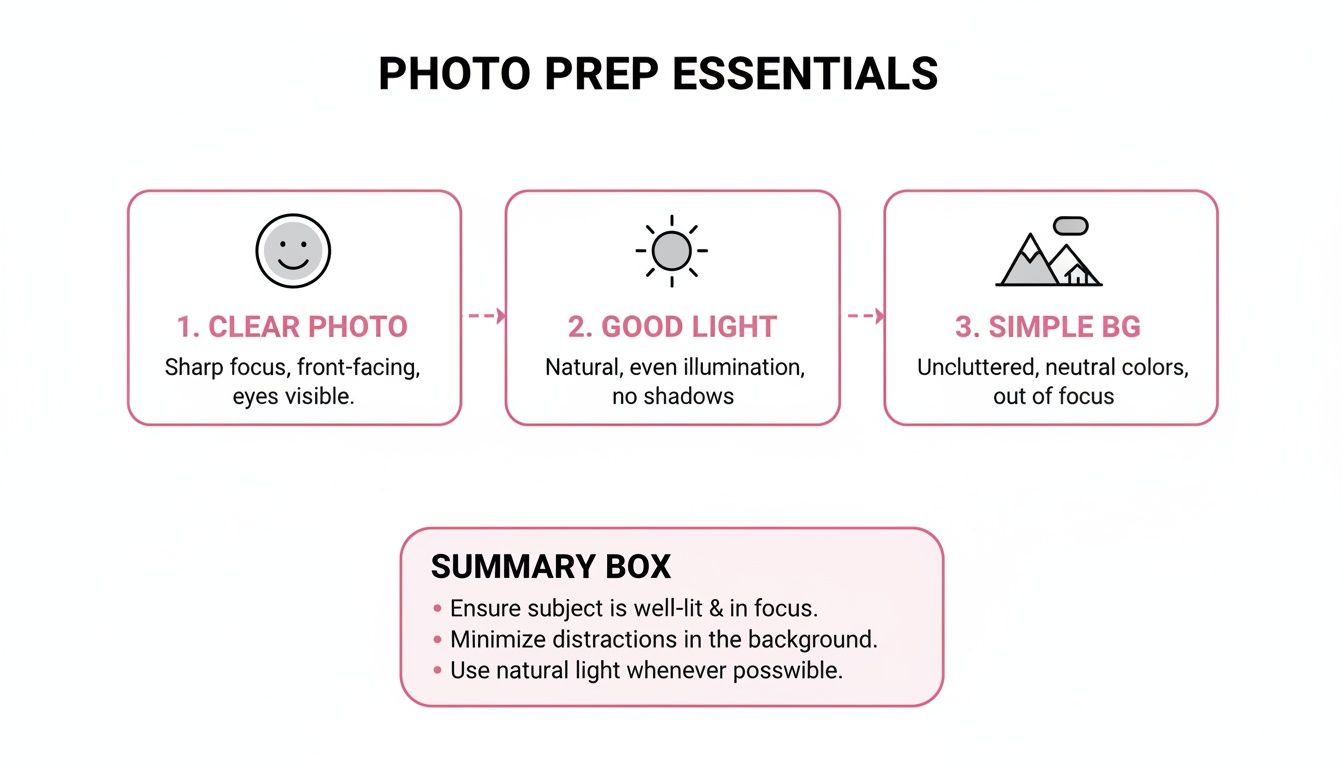
This quick visual reminder drives it home: a clear subject, good lighting, and an uncluttered background are your best friends, no matter which style you end up choosing.
Anime Style Guide: Which Look Is Right for You?
To help you narrow it down, I've broken down some of the most popular styles you'll find on tools like AnimePhoto.ai. Each one has its own strengths, making it easier to pick the perfect one to make your photo stand out.
| Style | Key Characteristics | Best For |
|---|---|---|
| Classic Cel-Shaded | Bright, flat colors with bold black outlines, resembling traditional 2D animation. | Vibrant social media avatars and fun pet portraits. |
| Chibi / Kawaii | Exaggerated cute features, large eyes, and a small body. Very playful and adorable. | Stickers, reaction images, and ultra-cute profile pictures. |
| Semi-Realistic | Combines anime aesthetics with realistic facial proportions and detailed shading. | Artistic portraits, fantasy characters, or a more sophisticated look. |
| Cyberpunk | Features neon highlights, futuristic elements, and a darker, tech-inspired color palette. | Edgy gaming profiles, sci-fi themes, and dramatic visuals. |
| Manga (B&W) | Uses black and white with screentones for shading, mimicking Japanese comic books. | Creating dramatic, high-contrast images with an artistic flair. |
This table should give you a solid starting point for experimenting. Don't be afraid to try a few different styles on the same photo—sometimes the most unexpected choice delivers the most striking result. To see even more options, you can explore our guide on the best AI anime art generators out there.
Putting Your Cartoon Creations to Work
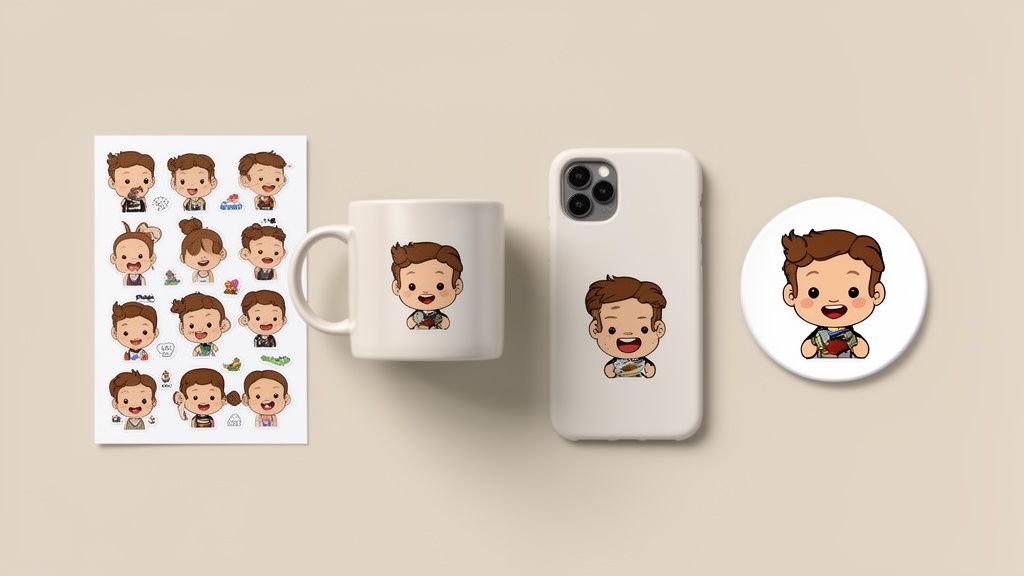
Alright, you’ve done the fun part and turned a photo into an awesome cartoon. So... now what? Sure, you can slap it on your profile and call it a day, but that’s just scratching the surface. You've just created a super unique piece of personal art, and it's time to get creative.
Think of your new cartoon not just as a picture, but as a core piece of your personal brand or the starting point for some seriously cool projects.
Give Your Online Presence a Major Boost
In the sea of standard headshots and generic avatars, a custom cartoon of yourself is a fantastic way to stand out. It’s got personality. For streamers and content creators, this is pure gold—you can build an entire visual identity around it.
- Custom Emotes & Stickers: Imagine dropping a cartoon version of your own shocked face into the group chat. You can easily turn your cartoon expressions into custom sticker packs for apps like Telegram or WhatsApp.
- Branded Overlays & Banners: A consistent look is a professional look. Use your cartoon avatar on your Twitch stream, YouTube banner, or even your email signature to tie everything together.
- Next-Level Social Content: Why just post text when you can create short comics or memes using different cartoon versions of yourself? It's a much more engaging way to share updates with your audience.
The real aim here is to build a memorable visual identity. When people see your unique cartoon avatar, they’ll instantly recognize your content, whether it's in a comment section or a video thumbnail. It becomes your personal trademark.
This isn’t just a niche hobby, either. The AI anime generator market was valued at a whopping USD 91.38 billion and is projected to hit USD 384.40 billion by 2030. People are clearly hungry for high-quality, personalized digital art.
Make Some Unforgettable Physical Gifts
Your cartoon creations don't have to stay on a screen. Since the AI spits out a high-quality image, it’s perfect for printing on all sorts of physical items, making for some truly one-of-a-kind gifts.
Think bigger than a standard photo gift. You could design a custom coffee mug with a cartoon portrait of your best friend, or create matching t-shirts for the whole family on your next vacation. I've also seen people make amazing custom phone cases, keychains, and even framed prints to hang on the wall.
Once you have the image, you can create some really unique keepsakes. For instance, you can turn your cartoon photo into a custom charm for a necklace or bracelet. The possibilities are pretty much endless once you let your imagination run wild.
How Credits, Privacy, and Payments Actually Work
So, you're ready to turn your photos into awesome cartoons. But before you jump in, it's smart to understand the nuts and bolts of how these tools handle your money and your photos. Let's pull back the curtain on services like AnimePhoto.ai so you know exactly what to expect.
A lot of these platforms run on a credit system, which I honestly prefer over a subscription. Instead of getting locked into a monthly fee, you just buy a bundle of credits—maybe enough for 10 or 50 creations. You use them as you need them.
This "pay-as-you-go" model means no surprise renewals or digging through settings to cancel a membership you forgot about. It’s simple and puts you in control of your spending.
Is My Data Safe? It's a Fair Question
Uploading a personal photo anywhere online can feel a bit nerve-wracking. I get it. The good news is that any reputable service takes this stuff seriously. When you upload your picture, it's processed on secure servers, and the final cartoon is for your eyes only.
Your privacy should never be an afterthought. A good platform will never share, sell, or publicly post your original photos or the cartoons you make. They belong to you, period.
This is a fundamental promise. If you ever want to dig into the nitty-gritty details of how your data is protected, you can always check out their full privacy policy.
Secure and Straightforward Payments
Paying for your credits should be just as secure and painless. Most top-tier services, including AnimePhoto.ai, use a trusted payment processor like Stripe. This is the same secure system that millions of businesses around the globe rely on, so you know your financial info is in good hands.
The process is designed to be safe and transparent. Here’s how it usually works:
- First, you pick a credit package that fits what you want to do.
- Then, you’re sent over to a secure payment page managed by Stripe.
- Your payment details are handled directly by them, not the cartoon generator tool itself.
This keeps your sensitive information locked down behind multiple layers of industry-standard security. It’s all about giving you peace of mind so you can focus on the fun part—creating.
Dealing With Common AI Transformation Hiccups

Even with powerful AI, you'll occasionally run into some weird results. When you're turning a photo into a cartoon, a few glitches can pop up, but thankfully, most of them are pretty easy to sort out with a couple of quick tweaks.
What to Do When the AI Gets It Wrong
The most common issue I see is the final cartoon just... not looking like the person in the original photo. This usually isn't the AI's fault. It's often caused by tricky lighting, an unusual camera angle, or a cluttered background that threw the algorithm for a loop. The simplest fix? Just try again with a better photo, keeping in mind the preparation tips we went over earlier.
Another classic problem is when the AI misinterprets small details. Think glasses getting warped into strange shapes or a delicate necklace blending into the fabric of a shirt. Some artistic styles are naturally more abstract than others, so if a specific detail is crucial, start with a more realistic style to get the basics right before you go for something more out-there.
Fixing Distortions and Odd Artifacts
Ever get a result with splotchy colors or random lines that weren't in the original? Those are digital artifacts, and they’re almost always a sign that the source image quality was too low. A pixelated or blurry photo doesn't give the AI enough clean data, forcing it to make educated guesses that don't always pan out.
If you're running into these issues repeatedly, it's worth taking a moment to clean up your source image. We have a whole guide on how to fix pixelated photos that can help you get a much cleaner result from the AI.
My Two Cents: Your input quality directly controls your output quality. A sharp, well-lit, high-resolution photo is your single best weapon against pretty much any AI glitch.
The technology behind these tools is moving incredibly fast. The global market for AI generators is projected to hit USD 3 billion, driven by new features like 4K exports and lightning-fast processing. The best tools can now crank out a fantastic result in under 10 seconds, keeping all the important details intact. To learn more about where things are headed, check out these innovations in AI cartoon generation. By giving the AI a great photo to start with, you're setting yourself up to take full advantage of its power.
Got Questions About Cartoon Generators? We've Got Answers.
Jumping into the world of AI art can feel like a bit of a mystery at first, especially when you're turning a photo into a cartoon. I get it. Let's walk through some of the most common questions people ask to help you get the absolute best results from the get-go.
A lot of people assume these tools are just for human portraits, but you'd be surprised at how flexible they are. The AI has been trained on an incredible range of images, so it knows how to handle more than just faces.
Can I Turn My Pet Into a Cartoon?
You absolutely can! In fact, AI generators like AnimePhoto.ai are perfect for making hilarious and adorable portraits of your pets. The trick is the same as with people: use a photo where your pet's face is clear and the lighting is good.
From my own experience, styles with softer lines and vibrant colors—think "chibi" or "classic cel-shaded"—tend to produce amazing results. They have a way of capturing a dog's goofy personality or a cat's majestic indifference perfectly.
Does the AI Work With Group Photos?
Yes, group photos are definitely on the table. The key to making it work, though, really comes down to the quality of the original picture. For a clean transformation, you need every single person's face to be clearly visible and not too far away from the camera.
Imagine turning a photo from your last family reunion or a team outing into a set of matching avatars. It’s a great idea! Just keep in mind that a really busy or chaotic background might trip up the AI. A nicely composed shot will always give you a better cartoon.
Here's the most important takeaway: Clarity is everything. Whether you're uploading a solo shot, a group picture, or a photo of your golden retriever, the AI needs clean visual data to do its job well. A sharp photo is the foundation for a great cartoon.
Are My Uploaded Photos Safe?
This is a big one, and it's a completely fair question to ask. Any trustworthy service is going to put your privacy first. When you upload a photo, it should always be sent over a secure connection, and your images should never be made public or used without your explicit say-so.
Always take a moment to find the privacy policy on the site. A good one will clearly explain how your data is handled. With a platform you can trust, your original photos and the art you create are for your eyes only.
Do I Need Special Skills to Do This?
Not in the slightest. That’s the real beauty of today's AI tools—they’re built for everyone, no matter your tech-savviness. The whole process is designed to be as simple and automated as possible.
You don’t need a background in graphic design or any experience with complicated editing software. The workflow couldn't be more straightforward:
- Upload the photo you want to use.
- Pick an art style you like.
- Let the AI take it from there.
In just a few moments, you get a fantastic-looking cartoon without any of the manual work.
Ready to see what your own photos look like with a creative twist? AnimePhoto.ai makes it fun and easy to create amazing cartoon art in seconds. Give it a try at https://animephoto.ai.

See yourself in anime style in under a minute
Pick a style, upload a photo, and get a high-quality anime portrait ready for profiles, prints and gifts.
Create your anime photo

