Ever wondered, "make my photo anime"? Well, it's never been easier. Thanks to some seriously smart AI, you can now skip the years of art school and get a gorgeous, stylized anime portrait in seconds. Just upload a photo, and the AI handles all the tricky parts.
The Easiest Way to Turn Your Photo Into Anime
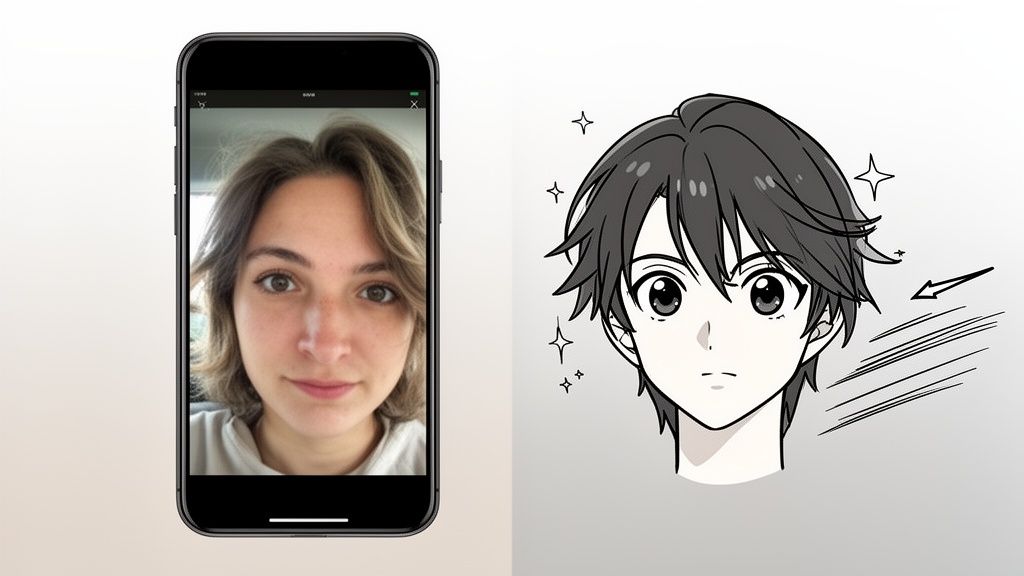
The dream of seeing yourself drawn as an anime character used to be just that—a dream, unless you were a talented artist. But AI has completely flipped the script, putting the power of anime transformation in everyone's hands.
This isn't just a small change; it's a huge leap forward for a few simple reasons:
- It's Incredibly Fast: Forget waiting days or even hours for an artist. AI generators pump out stunning images in minutes. The whole process is dead simple: upload a pic, pick a style you like, and hit generate.
- Endless Creative Styles: You can try out dozens of different looks without any commitment. Ever wondered if you’d look better in a gritty shonen style or a dreamy, magical girl aesthetic? Now you can find out with a single click.
- Seriously Good Quality: Let's be honest, early AI art was a bit... weird. But today's tools create polished, professional-looking images that are perfect for a new profile picture, a unique gift, or just for fun.
A Trend Fueled by a Global Passion
This creative explosion is no accident. It’s directly tied to anime's massive growth in popularity. The global anime market is an absolute juggernaut, valued at USD 32.15 billion this year and expected to soar to USD 72.35 billion by 2035.
As anime moves from a niche hobby to a global cultural phenomenon, more and more fans want to be a part of that world. Turning their own photos into anime art is a fantastic way to do just that.
AI Anime Converters vs Traditional Methods
To put it in perspective, let's compare the new AI-powered approach with the old-school way of doing things. It really highlights how much has changed.
| Feature | AI Anime Converters (e.g., AnimePhoto.ai) | Traditional Digital Art (e.g., Photoshop) |
|---|---|---|
| Skill Required | None. Just upload a photo. | Advanced artistic skill and software knowledge. |
| Time to Create | Seconds to minutes. | Hours to days, depending on complexity. |
| Cost | Typically a small fee per batch of images. | Hundreds or thousands for software and artist commissions. |
| Style Variety | Dozens of styles available instantly. | Limited to the artist's personal style and ability. |
| Revisions | Instant. Just generate a new batch. | Time-consuming and may cost extra. |
The table makes it pretty clear: AI has made this creative outlet accessible to pretty much everyone, regardless of budget or artistic talent.
Before AI, turning a photo into high-quality anime art meant shelling out for software like Photoshop and having some serious digital painting chops. Today, anyone can get similar—and sometimes even better—results with just a couple of clicks.
This newfound accessibility opens up a world of creative possibilities. If you want a deep dive into the best options available, these dedicated Image to Anime AI tools are a great place to start. They really show what's possible, bridging the gap between your imagination and a finished piece of art.
How to Choose and Prep the Perfect Photo for AI
The final quality of your anime art really hinges on the photo you start with. When your goal is to make my photo anime, giving the AI a clean, clear image is the most critical thing you can do. It's like handing an artist a great reference photo—the better the source material, the more stunning the result.
So, what makes a photo "perfect" for an AI? You don't need a professional headshot. Honestly, a simple selfie often works far better than a busy, scenic vacation picture.
Key Ingredients for a Great Source Photo
The AI has to clearly see the subject's features to translate them into an anime style. Focusing on a few key elements can make a massive difference in the final output.
- Good Lighting is Non-Negotiable: Your face should be evenly lit, ideally from the front. Avoid harsh shadows, backlighting (like standing in front of a bright window), or dim, moody lighting. These can hide details like your eyes and jawline, which will confuse the AI.
- Keep the Background Simple: A cluttered background filled with people, distracting patterns, or random objects can pull the AI's focus away from you. A plain wall, a clear sky, or even a nicely blurred backdrop is perfect because it helps the generator concentrate on what matters.
- Direct Eye Contact Wins: Photos where you're looking straight at the camera almost always produce the most engaging and accurate anime portraits. In most anime styles, the eyes are everything, so giving the AI a clear view of them is essential.
- High Resolution Matters: A blurry or pixelated photo is a recipe for a muddy, undefined anime image. You don't need a fancy camera—most modern smartphone photos are more than good enough—just steer clear of low-quality pictures you've saved from social media.
The secret to a great AI anime conversion is clarity. A high-contrast selfie where your facial features are the undisputed star of the image will consistently outperform a beautiful but busy landscape photo.
Simple Prep Work for Maximum Impact
Before you upload that picture, a couple of quick tweaks can seriously boost its potential. These adjustments take less than a minute in any basic photo editing app and don't require any special skills. For a deeper dive into photo editing, you can check out our guide on how to make photos look professional.
First up, crop your photo strategically. You want the AI to focus on your face and upper body. Just crop out any distracting background elements or other people to make sure you're the star of the show. A tight, portrait-style crop is almost always your best bet.
Next, a tiny adjustment to brightness and contrast can work wonders. If the photo is a little dark, bumping up the brightness will help reveal facial details the AI might miss. A slight boost in contrast helps define the edges of your features, giving the generator a much clearer map to work from. This little bit of prep gives the AI the best possible information, leading to a much cleaner and more polished anime transformation.
Your Hands-On Guide to Using an AI Anime Generator
Alright, let's get to the fun part: actually turning your photos into anime. We'll walk through the creative process using AnimePhoto.ai as our main example. This isn't just about mindlessly clicking buttons; it's about making smart choices to get a result you'll genuinely love.
The tech behind these tools is moving at an incredible pace. What we're seeing with photo-to-anime conversion is a big shift in how we can all create cool, personal content. It reminds me of how the animation industry itself went digital. Today, computer-generated animation makes up a staggering 85% of the market. This same kind of power now lets anyone turn their photo into an anime-style masterpiece, something that used to require a skilled artist.
Navigating the Creative Dashboard
Once your photo is uploaded and ready to go, you’ll find yourself on the main creation screen. Think of this as your artistic cockpit. Instead of burying you in confusing menus, tools like AnimePhoto.ai keep things simple by showing you a visual gallery of styles.
Even before you get there, the prep work is straightforward. It really boils down to three simple stages.
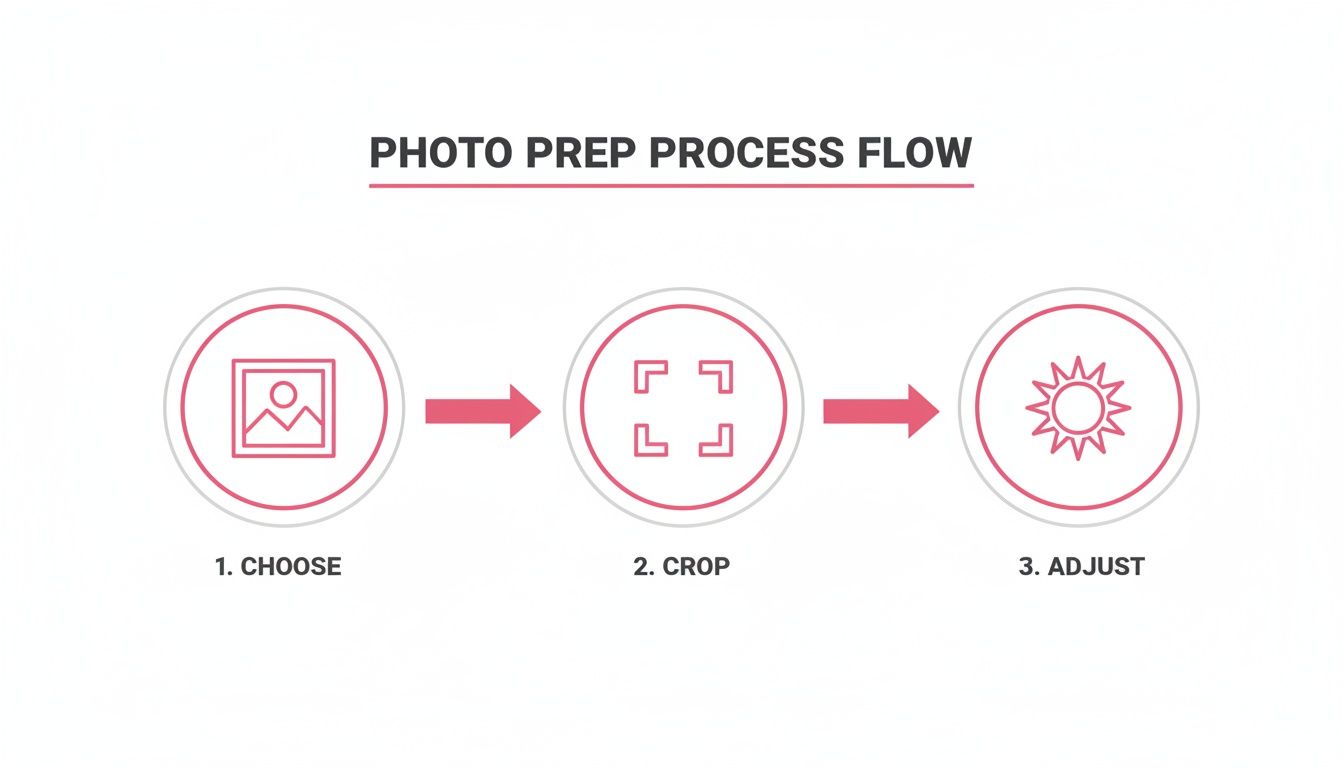
As you can see, it all starts with picking a good portrait, cropping it well, and making any small tweaks needed. Get that right, and you're already halfway to a great result.
Back on the dashboard, your main job is to browse the styles and find one that clicks with the vibe you're going for. The options are laid out with clear previews, so you get a solid idea of the final look before you even commit.
Choosing Your Perfect Anime Style
The style you pick is everything. It sets the entire mood for your final image, making it the most critical creative decision in the whole process. Don't rush it! Think about the person in the photo and the story you're trying to tell.
- Shonen Style: This is your go-to for bold lines, action-packed energy, and intense expressions. It works great for creating a powerful, dynamic look, just like what you'd see in a classic battle anime.
- Shojo Style: If you're after large, expressive eyes, softer colors, and a more romantic or dreamy feeling, this is the one. It’s perfect for capturing a gentle, emotional mood.
- Chibi Style: Want something super cute and playful? Chibi style gives you that adorable, "super-deformed" look with a large head and a tiny body. It’s fantastic for fun avatars or even pet portraits.
- Manga (Black & White): For a classic, graphic novel feel, this style is unbeatable. It mimics the look of a printed manga page with sharp ink lines and screentones for a dramatic effect.
My Personal Tip: Feeling stuck? Generate your photo in two totally opposite styles, like Shonen and Shojo. The contrast will immediately show you which direction feels more natural for your particular picture.
Fine-Tuning Your Transformation
After you've picked a style, some tools give you a bit more control. You might see sliders or options to adjust the intensity of the anime effect. A lower setting will keep more of the original photo's details, while cranking it up will push it further into a pure illustrative style.
The real magic is in the experimentation. Don't just settle for the first image you get. Run it a few times. Your first result might be good, but the third or fourth could be the one that truly wows you. The speed of AI makes this kind of creative play not just possible, but genuinely fun.
If you want to see more of what these tools can do, take a look at our deeper dive into a top-tier AI anime picture generator. Once you land on an image you absolutely love, just download the high-resolution file and get ready to show off your new anime self
Creative Ideas for Your New Anime Artwork
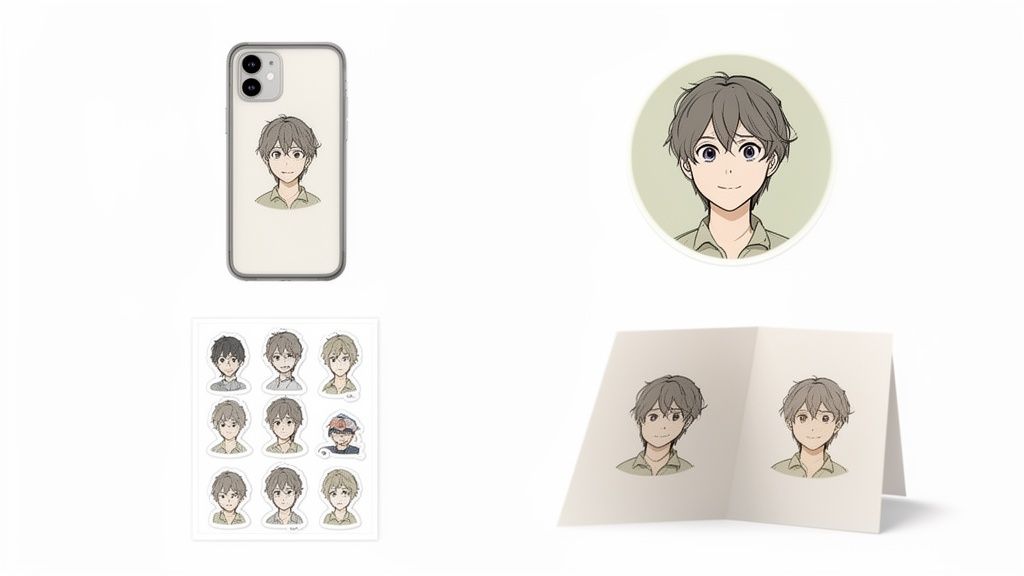
Okay, so you've successfully turned your photo into a piece of anime art. Now the real fun begins. You've got this unique digital file, but what do you actually do with it? The possibilities go way beyond just a new profile picture.
Your new artwork is a launchpad for personalizing just about anything. Think about your online presence first. A custom anime avatar makes your profile instantly stand out on platforms like Discord, Twitch, or gaming forums. Instead of some generic icon, you get a character that’s truly you.
Upgrade Your Digital and Physical World
But don't just keep it online. Your anime creations are perfect for turning into real-world items that you can use, wear, or share.
- Custom Merch: Ever wanted your face (anime-style) on a phone case, a coffee mug, or a t-shirt? Custom printing services make it ridiculously easy to upload your file and create a one-of-a-kind product.
- Personalized Stationery: Imagine turning a family photo or a picture of your dog into a set of custom greeting cards. An anime version of a special memory adds a creative, heartfelt touch that you just can't get from a store-bought card.
- Unique Sticker Packs: This one's my favorite. Take a few different photos, turn them into anime expressions—happy, surprised, laughing—and compile them into a custom sticker pack for apps like Telegram or WhatsApp. It’s a great way to share inside jokes with your friends.
Your anime portrait isn’t just a static image; it's a creative asset. Think of it as a starting point for countless projects, from personalized gifts that leave a lasting impression to custom gear that showcases your personality.
Create Heartfelt and Memorable Gifts
Honestly, one of the best uses for this kind of art is creating gifts that feel incredibly personal. Turning a shared memory into an anime illustration is a brilliant way to celebrate a relationship or a special occasion. It shows you put in the thought to create something unique.
A couple’s portrait, for instance, can be transformed into a beautiful anime scene. It makes for an unforgettable anniversary or Valentine's Day gift because it captures your connection in an artistic and sentimental style.
And don't forget pet portraits! We all see our pets as characters, and seeing them reimagined as a cute anime hero is just pure joy. This is a surefire hit for any pet owner, capturing their furry friend's personality in a completely charming way.
Ultimately, these ideas take the simple act of turning a photo into anime and make it a meaningful way to express yourself, connect with others, and add a little more custom art to the world.
Understanding Privacy and Payments on AI Platforms

Jumping into the world of AI art should be fun, but it's totally normal to wonder what happens to your photos and how much it all costs. Before you turn your favorite picture into an anime masterpiece, let's walk through the two things you should always check: your privacy and the payment options.
Your Photos Stay Your Photos
First things first: what happens to your pictures after you upload them? This is a big deal. The main thing to look for is whether a service uses your images to train its own AI models. Some do, but a platform that respects your privacy, like AnimePhoto.ai, will have a strict policy against it. Your photos should be used only to create your art, and nothing else.
A trustworthy service will always be upfront about data usage. They should clearly state that your images are not used for AI training and are automatically deleted from their servers after a short time.
You can almost always find this information in the site's privacy policy or terms of service. It’s worth the quick scan. For a good example of what this looks like, you can check out the https://animephoto.ai/privacy-policy.
How You Pay for Your Creations
Once you're comfortable with the privacy side of things, it’s time to look at the cost. Most AI anime generators don't use a one-size-fits-all model, which is great because you can pick what works for you. You'll typically run into a few common options.
- Free Trials: This is your test drive. Most good platforms let you create a few images for free so you can see the quality for yourself before you decide to spend any money.
- Credit Packs: Think of this as a "pay-as-you-go" plan. You buy a set amount of credits upfront and spend them whenever you want to generate an image. This is perfect for one-off projects, like making a new profile picture.
- Subscriptions: If you’re planning to create a lot of anime art, a subscription is usually the way to go. A monthly or yearly plan often gives you a huge number of generations (or even unlimited) for a flat fee, which is much more economical for frequent users.
Think about what you need. A small credit pack is probably all you need for a new avatar. But if you're working on a big project, like turning an entire photo album into a gift, a subscription could save you money in the long run.
Ultimately, taking a moment to review the platform's privacy policy and understand the costs ensures your creative journey is both enjoyable and secure.
A Few Common Questions About Turning Your Photos Into Anime
Even when a process is straightforward, a few questions always pop up. It's totally normal. Getting the answers sorted out beforehand means you can dive in, have fun, and get a result you love on the very first try.
So, let's walk through some of the things people often ask.
Will This Actually Work on Pictures of My Pet?
Oh, absolutely! It's one of the most fun things to try. The AI behind modern anime generators isn't just trained on human faces; it's seen a massive library of images, including tons of animals. You'd be surprised at how well it can capture a pet's personality.
For the best results, start with a clear, well-lit photo where your pet is the star of the show. The AI is fantastic at picking up their unique features and translating them into an adorable anime style. It's the perfect way to create a one-of-a-kind portrait of your furry (or feathered) best friend.
What's the Best Resolution for the Final Anime Image?
This really comes down to what you plan to do with your new masterpiece. Think about where it's going to live.
- For online use: If you're just making a new avatar for Discord, a gaming profile, or social media, a standard HD size like 1024x1024 pixels is perfect. It'll look sharp on any screen.
- For printing: Now, if you're thinking bigger—like printing it on a t-shirt, a poster, or a mug for a gift—you need the highest resolution possible. A low-res image will look blurry and pixelated when you print it, and nobody wants that.
Many services, including AnimePhoto.ai, give you upscaling options. This creates a high-resolution file that's ready for physical merch, making sure your art looks crisp and professional.
Pro-tip: I always recommend downloading the highest quality version available, even if you just plan to use it online for now. You never know when you'll want to print that amazing pet portrait for a friend!
Can I Use Group Photos with a Few People in Them?
You sure can, but there are a few things to keep in mind to get a good result. The AI's performance really depends on how well it can see and identify each individual face.
It tends to work great for photos with two or three people, especially if everyone is relatively close to the camera and facing forward. Think couples' shots or pictures with your best friend. The AI can easily distinguish each person and apply the style consistently.
Where it gets a little tricky is with big, busy group photos. If faces are small, partially hidden, or turned at weird angles, the AI might struggle to render everyone perfectly. If you're aiming for a flawless anime version of a large group, a good workaround is to process individual photos of each person separately. Then, you can use a simple photo editor to combine them into a single image. It gives you way more control and ensures everyone looks their best.
How Long Does This Whole Process Take?
Honestly, the speed is one of the most impressive parts. Forget waiting days or weeks for an artist to finish a commission. This is practically instant.
With a tool like AnimePhoto.ai, converting a photo usually takes anywhere from 30 seconds to a couple of minutes.
The exact time might fluctuate a bit depending on how busy the servers are, how complex your photo is, or which specific style you picked. But that rapid turnaround is what makes it so addictive. You can experiment with tons of different photos and styles without any delay, letting you find that perfect look in no time.
Ready to give it a shot? Stop wondering what you'd look like as an anime character and find out for yourself. With AnimePhoto.ai, you can transform your favorite pictures into incredible art safely, quickly, and with results that will definitely make you smile. You can get started right now at https://animephoto.ai.

See yourself in anime style in under a minute
Pick a style, upload a photo, and get a high-quality anime portrait ready for profiles, prints and gifts.
Create your anime photo

