Ever wondered what separates a stunning, professional photo from a simple snapshot? It's a common question, and the answer might surprise you. It’s not about owning the most expensive camera or having a fancy studio. The real secret is learning to see the world like a photographer.
The good news? This is a skill anyone can learn. Great photos come down to understanding three core elements: light, composition, and editing. Once you know how to shape light, frame your shot with intention, and apply a clean, subtle edit, you're on your way to creating consistently amazing images.
This guide will give you a clear, repeatable workflow to do just that. We'll skip the overly technical jargon and focus on the practical skills that make the biggest difference.
What We'll Cover
We’re going to build your skills from the ground up, focusing on a simple, three-part foundation. You’ll learn how to:
- See Light Differently: We’ll dive into how to find and use natural and artificial light to create mood, depth, and drama in your photos. It's the most crucial ingredient.
- Compose with Purpose: Forget just pointing and shooting. You'll learn how to arrange the elements in your frame to guide the viewer’s eye and tell a more powerful story.
- Edit for Polish: The final step is applying subtle, effective edits that enhance your image without looking fake or over-processed. This is how you achieve that clean, high-end look.
By the end, you'll have a roadmap to consistently creating images that not only capture attention but look genuinely professional.
Before we dive into the specific techniques, let's quickly summarize the core concepts that turn everyday snapshots into professional-quality images. Think of these as the absolute fundamentals—get these right, and you're 90% of the way there.
Key Pillars of Professional Photography
| Pillar | What It Is | Why It Matters |
|---|---|---|
| Lighting | How you use natural or artificial light to illuminate your subject. | Good lighting creates depth, mood, and focus. It’s the single most important element in photography. |
| Composition | The arrangement of elements within the frame. | A strong composition guides the viewer's eye and tells a clear story, making the image more engaging. |
| Editing | The post-production process of refining an image. | Subtle editing enhances colors, corrects flaws, and adds a final layer of polish for a professional finish. |
These three pillars work together to create a powerful final image. Mastering them is a continuous journey, but even small improvements in each area can have a huge impact on your work.
The single most important component of a camera is the twelve inches behind it.
— Ansel Adams
Ansel Adams really hit the nail on the head. Your eye, your creative decisions, and your understanding of these principles are far more powerful than any piece of gear. Let's start building that blueprint.
Mastering Light: Your Most Powerful Tool
If you take away only one thing from this guide, let it be this: great photography is all about light. It’s the single most powerful tool you have for turning a simple snapshot into something that looks and feels professional. Learning to see, shape, and control light—whether it’s the sun in the sky or a lamp in your living room—is where the real magic happens.
This isn’t just some artsy-fartsy opinion, either. It has a huge real-world impact. Posts with professional-looking photos can get up to 94% more views on social media. It’s no surprise the photography services market is a $55.6 billion industry. When you ask the pros, a massive 85% of professional photographers say that lighting is the most critical element for a high-quality shot. You can dig deeper into the value of these skills over at jeradhillphoto.com.
This simple diagram breaks down the entire process. Notice what comes first.
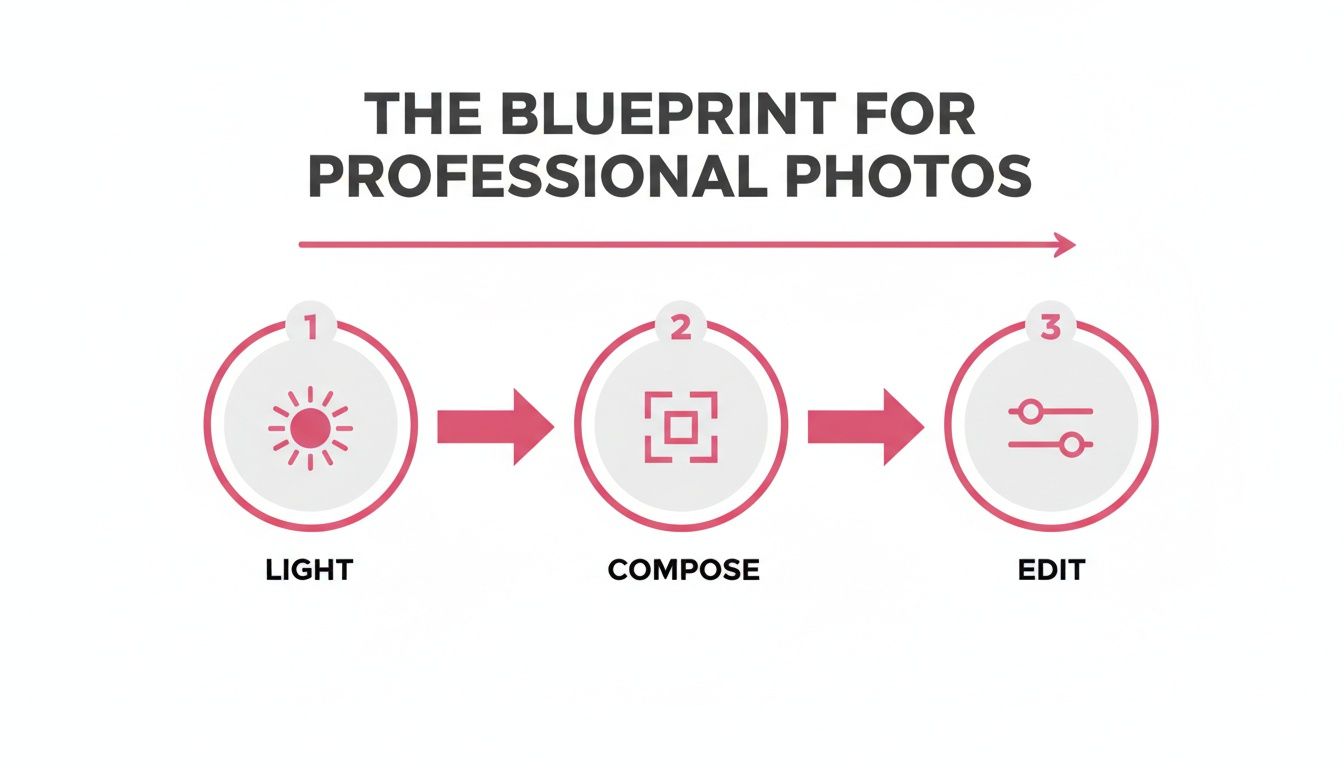
Before you worry about the perfect angle or start fiddling with editing apps, your first job is to find good light.
Working With Natural Light
The best light is often the light that’s all around us—and it's free. The trick is knowing how to use it, because the sun’s light changes dramatically throughout the day.
- Golden Hour: This is that magical time just after sunrise or right before sunset. The light is soft, warm, and comes from a low angle, which carves out your subject with long, beautiful shadows and a flattering glow. It's practically foolproof for portraits.
- Blue Hour: Stick around after the sun dips below the horizon (or get up just before it rises), and you'll find the blue hour. The light is cool, moody, and incredibly soft. It’s perfect for dramatic cityscapes or atmospheric portraits.
- Midday Sun: This is the light most people struggle with. The high, direct sun creates harsh, dark shadows and can blow out the highlights in your photo, making everything look flat and intense. The solution? Find open shade. The shadow from a building or a big tree acts like a giant natural softbox, giving you soft, beautiful light even in the middle of the day.
My favorite indoor hack is simply using a window. Place your subject near a large window, but not in the direct, sunny spot. This creates a gorgeous, directional light source that wraps around your subject, much like a professional studio light.
Simple Artificial Lighting Setups
What about when the sun goes down or you’re stuck indoors with no good windows? You don't need a truckload of expensive studio gear.
A ring light is a fantastic, budget-friendly starting point. It provides a flat, even light that kills shadows on the face, and it creates those distinct circular "catchlights" in the eyes. It's a go-to for portraits, selfies, and video calls for a reason.
If you have a flash that can be detached from your camera, you've got a seriously powerful tool. Don't point it directly at your subject—that’s how you get that deer-in-the-headlights look. Instead, point the off-camera flash at a white ceiling or a nearby wall. This trick, called "bouncing," turns that entire surface into a massive, soft light source that illuminates your subject beautifully. You can learn more about how different light sources affect your images in our guide to the best lighting for portrait photography.
Once you start controlling your light source, you stop being someone who just takes pictures. You become someone who makes them—intentionally shaping the mood and feel of every shot. That’s the mark of a pro.
Composing Your Shot with Intention
Great lighting gets you halfway there, but composition—how you arrange everything in the frame—is what truly tells a story. It’s the secret ingredient that transforms a simple snapshot into a compelling image. By learning a few core principles, you can start creating photos that feel deliberate, professional, and guide the viewer's eye exactly where you want it to go.
This isn't just about artsy-fartsy rules; it has a real impact. Ever wonder why some photos just work on social media? Composition is a massive part of it. In fact, images that follow the classic rule of thirds get a staggering 38% more likes on Instagram. It’s a foundational skill in the professional photography market, an industry that’s projected to hit $66.8 billion** by 2035. Pros know how to frame a shot for maximum impact, which helps explain why the portrait photography niche alone brings in **$20.6 billion each year. You can dive deeper into the photography market on Precedence Research.
So, how do you start composing with purpose? Let’s break down a few powerful techniques you can use right away.
Embrace the Rule of Thirds
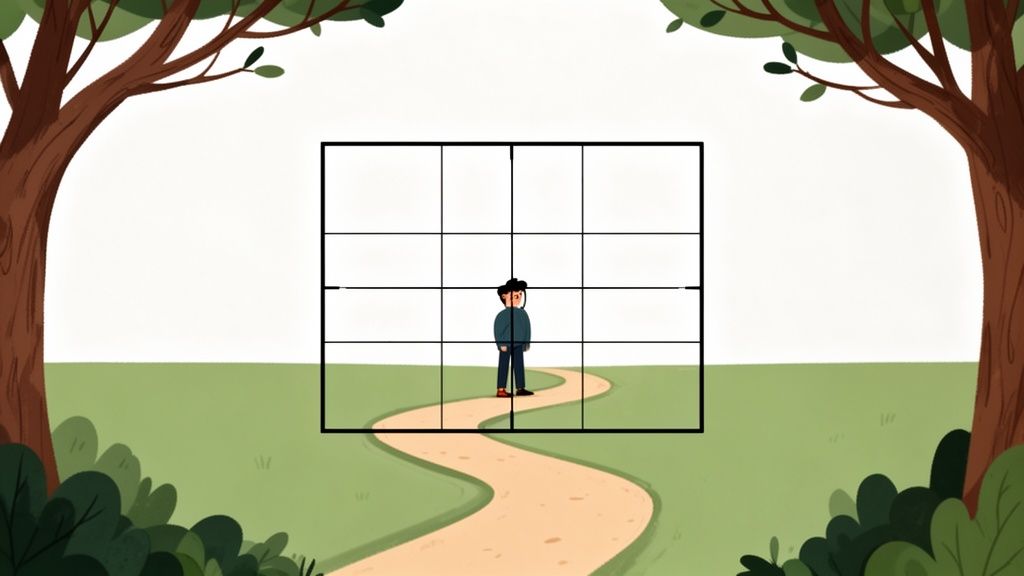
If you learn only one composition rule, make it this one. Imagine your screen is divided by a tic-tac-toe grid. The rule of thirds suggests placing your main subject not dead center, but along one of the lines or, even better, where two lines intersect.
This simple adjustment instantly creates a more dynamic and visually engaging photo than a centered "bullseye" shot. Just about every camera and smartphone has a grid overlay you can turn on in the settings. Flip it on. It’s the single fastest way to start taking better photos today.
Pro Tip: When shooting a person looking to the side, place them on a vertical line so they’re looking into the open space of the frame. This gives the photo "breathing room" and creates a natural sense of direction and story.
Guide the Eye with Leading Lines
Our brains are hardwired to follow lines. In photography, we can use leading lines—things like roads, fences, rivers, or even shadows—to pull the viewer's eye through the frame and toward our subject. It's a fantastic way to create a sense of depth and guide the visual journey.
Think about it: a person standing at the end of a winding path is far more interesting than someone just standing in an open field. The path acts as a visual roadmap, pulling you right to the focal point. Keep an eye out for these natural lines wherever you are; they add structure and flow to any shot.
Add Depth with Framing
Another great trick is to use elements in the foreground to create a natural frame around your subject. This technique, simply called framing, immediately adds context and a powerful sense of depth.
You can find frames almost anywhere. Try shooting through:
- A doorway or window
- Overhanging tree branches
- A gap in a fence
- Even over someone's shoulder
This makes the viewer feel like they’re peeking into the scene, which gives the image an intimate, layered quality. Suddenly, a flat photo feels more three-dimensional.
Once you’ve got these down, you can explore even more ways to compose a killer shot. For a deeper dive, check out our guide on advanced photography composition techniques. By consciously using these principles, you’ll start making more thoughtful and impactful photos every time you shoot.
The Art of Post-Processing and Editing

Taking the photo is really just step one. The real magic often happens in post-processing, which is a fancy term for editing. This is where you get to refine your vision and add that final layer of polish that separates a good snapshot from a truly professional image.
Think of editing less like a rescue mission for a bad photo and more like enhancing an already great one. The goal isn't to create something fake. Instead, a tasteful edit subtly guides the viewer's eye, perfects the color and exposure, and brings the whole image to life.
You don't need a complex setup anymore. Powerful tools like Adobe Lightroom, Snapseed, or even the editor built right into your phone give you all the control you need. Let’s walk through a simple, effective workflow.
Start with Cropping and Straightening
Before you even think about colors or brightness, fix your composition. Honestly, this is often the fastest and most dramatic improvement you can make.
A crooked horizon is one of the classic giveaways of an amateur photo. So, your first move should always be to straighten the image. Use the gridlines in your editing app to line up any horizontal or vertical elements, whether it's the ocean, a tabletop, or the side of a building.
Next, crop the frame to strengthen the shot. Ask yourself a few key questions:
- Is there anything distracting on the edges? Get rid of it.
- Could I crop to better follow the rule of thirds?
- Is the subject clear, or does the frame feel cluttered?
Nailing this first step creates a solid foundation for every other adjustment you're about to make. It’s all about refining what you captured in the camera.
Nail Your Basic Adjustments
This is where you start playing with light, balancing the bright and dark areas to make your image pop. The key word here is subtlety. A little adjustment goes a very long way.
Focus on these core sliders first:
- Exposure: This is your overall brightness control. If the photo feels a bit too dark or washed out, a gentle nudge here is all you need. Pro tip: it's often better to shoot slightly underexposed, as it's much easier to recover details from shadows than from completely blown-out highlights.
- Contrast: This controls the difference between the darkest and brightest parts of your image. Bumping up the contrast can add some nice punch, but pushing it too far will crush the details in the shadows and make things look harsh.
- Highlights and Shadows: These sliders offer much more targeted control. Is the sky a little too bright? Pull the highlights down. Is your subject's face lost in shadow? Gently lift the shadows to bring back that detail without blowing out the rest of the image.
A professional-looking photo feels balanced. Your eyes should be drawn to the subject, not to overly bright spots or distracting deep shadows. Aim for a natural look that guides attention gracefully.
Mastering Color Correction
Getting your colors right is absolutely essential for a professional look, especially when dealing with skin tones or product shots. The goal is to make the colors look clean, intentional, and true-to-life.
Begin with White Balance. This setting is designed to correct any weird color casts from your light source. If a photo taken indoors looks too yellow or a shot from the shade looks too blue, adjusting the white balance will neutralize the scene and make your whites look actually white.
From there, move on to Vibrance and Saturation. They might seem similar, but they do very different things. Saturation boosts every single color in your photo equally, which can quickly make skin tones look orange and unnatural. Vibrance is smarter—it primarily targets the more muted colors, balancing everything out without overdoing it. A small touch of vibrance is almost always a better choice than a big push of saturation.
While we're focused on photos here, many of these visual principles apply across different media. In fact, these essential video editing tips for beginners can offer some great insights into improving your visual storytelling overall.
The Final Polish: Sharpening
Sharpening is the final touch that adds that satisfying crispness and clarity to your image. It’s critical that you save this for the very last step in your editing process.
Be careful here, because it’s easy to go overboard. Too much sharpening creates a gritty, digital-looking texture with weird halos around edges. You just want to add enough to make the important details—like the eyes in a portrait or the texture of a fabric—stand out clearly.
Most modern editing software includes a "masking" tool for sharpening. This is a game-changer. It lets you apply the effect only to the edges and details in your photo, leaving smooth areas like skin or a clear sky untouched. This selective approach is the secret to a refined, professional finish.
For a deeper dive, check out our complete guide to photo editing techniques to really take your skills to the next level.
The Finishing Touches: Backgrounds, Posing, and Polished Exports
You’ve nailed the lighting and your composition is solid. So what’s next? This is where the real magic happens. The final 10% of the process—managing the environment, guiding your subject, and exporting correctly—is what separates a good photo from a truly professional one. These details are what give your work that polished, deliberate feel.

Dialing In Your Backgrounds and Props
A great photo tells the viewer exactly where to look. If your background is too busy, it pulls focus from your subject and instantly cheapens the shot. Your goal is to make the background a supporting character, not the star of the show.
For portraits, you can almost never go wrong with something simple. A clean wall, a patch of open shade outdoors, or even just a solid-colored backdrop works wonders. Techniques like blurring backgrounds in photos and video are also a fantastic way to make your subject pop.
When it comes to props, use them to tell a story. A coffee mug for a cafe blogger or a vintage camera for a fellow photographer adds context and personality. Just be intentional.
Pro Tip: Less is almost always more with props. Before you add something, ask yourself: does this reinforce the story I'm trying to tell? If the answer is no, leave it out. One or two meaningful objects will have a much bigger impact than a table full of clutter.
Simple Posing and Styling That Works
Making someone look natural in front of a camera is one of the hardest parts of photography. The trick is to give gentle, actionable guidance. Telling someone to "act natural" is a recipe for awkwardness.
Instead, try these simple directions:
- Create Angles: A straight-on shot can look like a mugshot. Have them angle their body about 45 degrees from the camera, then turn their head back to face you. It’s instantly more dynamic and flattering.
- Give the Hands Something to Do: Hands are often the most awkward part of a pose. Give them a job! Have your subject hold a prop, rest a hand on their hip, or casually put one in a pocket.
- Introduce a Little Movement: Static poses feel stiff. Ask your subject to walk slowly towards you, shift their weight from one foot to the other, or even share a genuine laugh. This brings life and energy into the frame.
How to Export Your Photos for Flawless Results
You wouldn't frame a masterpiece in a cheap plastic frame, would you? Exporting your photos with the wrong settings can crush the quality and undo all of your careful editing work.
Getting your export settings right is crucial for every platform. Here’s a quick cheat sheet:
- For Websites & Blogs: A JPEG at 80-90% quality is the sweet spot. It keeps the file size down for fast loading times without sacrificing too much visual quality.
- For Instagram: The platform loves images with a width of 1080 pixels. Exporting at this dimension (e.g., 1080x1350 for a portrait) prevents Instagram from over-compressing your shot and making it look soft.
- For Printing: You need maximum quality here. Export as a full-resolution TIFF or a JPEG at 100% quality to ensure every pixel is perfect for print.
Got Questions? We've Got Answers
Everyone has questions when they're first figuring out how to make their photos look more professional. Let's tackle a few of the most common ones I hear all the time.
Is an Expensive Camera a Must-Have?
Honestly? No, not at all. It's so easy to get caught up in the gear, but a fancy camera is just a tool. The real magic comes from understanding the fundamentals—things like great lighting, a strong composition, and a clean editing workflow. These are the things that will elevate your work.
Your smartphone is probably more powerful than you think. Learn to master the craft with the camera you already have, and you'll be amazed at the quality you can achieve.
What's the Number One Editing Mistake Beginners Make?
Without a doubt, it’s over-editing. When you first discover all those sliders in your editing app, it’s incredibly tempting to crank everything to the max—saturation, contrast, sharpening, you name it. The problem is, this almost always makes a photo look harsh and unnatural.
A truly professional edit should feel almost invisible. The goal is to enhance the photo, not make the editing itself the star of the show.
Think of it as a gentle polish, not a complete overhaul. Subtlety is what gives you that high-end, polished result.
How Can I Find Great Lighting for Indoor Photos?
When you're shooting indoors, your best friend is a window. Seriously. Position your subject near a large window during the day, but try to avoid having direct, harsh sunbeams hitting them. What you're looking for is that soft, diffused light—it’s incredibly flattering and feels completely natural.
But what if the window light isn't quite enough? You can easily add a little boost without fancy equipment.
- Grab a simple lamp with a plain white lampshade and place it to the side of your subject.
- This little trick helps fill in any deep shadows on their face.
- Just be sure to avoid using overhead ceiling lights whenever possible. They tend to create awkward shadows under the eyes and nose that are really unflattering.
Ready to see your photos in a whole new style? Transform your favorite portraits into beautiful, shareable art with AnimePhoto.ai. Upload a photo, pick a style, and create your custom anime image in seconds. Give it a try at https://animephoto.ai

See yourself in anime style in under a minute
Pick a style, upload a photo, and get a high-quality anime portrait ready for profiles, prints and gifts.
Create your anime photo

