Take a quick scroll through your social media feeds. You'll notice something interesting—those standard, posed headshots are starting to disappear, replaced by something with a lot more personality. Turning a regular photo into a cartoon or anime-style image isn't just a gimmick anymore; it's how people are building memorable online identities.
It's about more than just a fun filter. This is about personal branding, creativity, and simply standing out from the noise.
Why Cartoon Avatars Are Popping Up Everywhere
In a sea of faces online, a unique avatar is your visual handshake. For streamers, YouTubers, and other creators, a consistent anime-style avatar is a branding goldmine. It builds instant recognition across Twitch, TikTok, or anywhere else they have a presence. It's not just a profile pic; it's a mascot that fans immediately connect to their content.
But you don't have to be a professional creator to get in on it. Many people use cartoon versions of themselves to show off a side of their personality a regular photo just can't capture. You can hint at your hobbies, match your mood, or just show your love for a certain art style, whether that's something fun and quirky or dark and edgy.
Building a Vibe and Finding Your People
This trend has become a way for online communities to create a shared identity. Gaming squads often create avatars with a similar style to look like a cohesive team. In the same way, art and anime communities use them to connect with others who share their passions. It’s a visual cue that says, "You're one of us."
At its core, a cartoon avatar gives you total control over your digital first impression. It lets you present the version of yourself you want—whether that's idealized, creative, or just more private—which is perfect for the online world.
Just look at the different styles you can get from tools like AnimePhoto.ai. The image below shows how a single photo can be transformed into completely different characters.
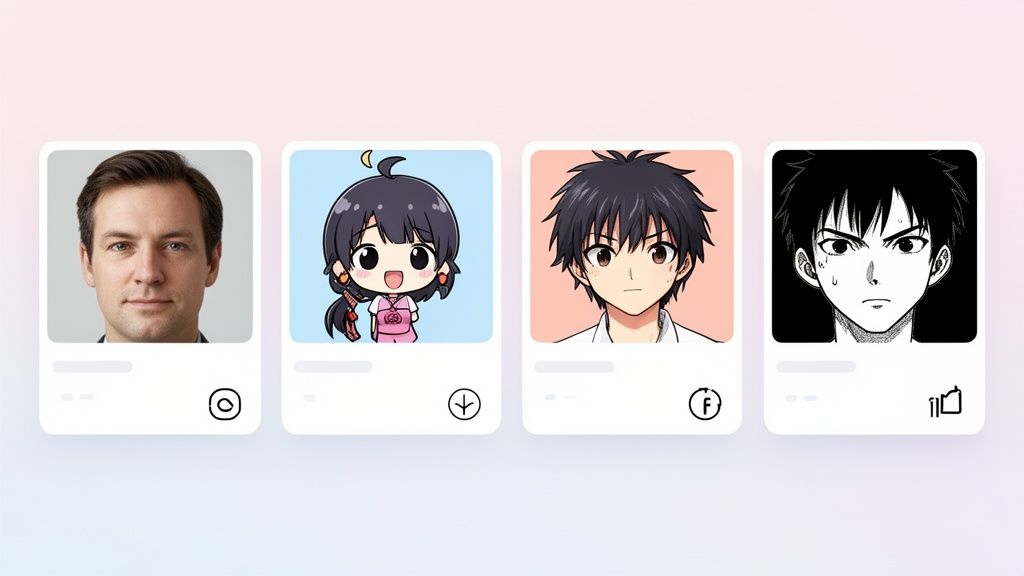
Each style gives off a totally different vibe, from friendly and playful to serious and intense. This kind of flexibility is exactly why so many people are drawn to it.
What's Fueling This Trend?
It all comes down to two things: accessibility and a deep-seated desire to personalize our digital lives. These tools are incredibly easy to use now.
Recent surveys found that 72% of users aged 18-34 said their main reason for using these tools was to create unique avatars and one-of-a-kind family portraits. And it's not just for people anymore—the tech is good enough to handle pets and even landscapes, so dog and cat owners are getting in on the fun, too. This isn't a niche hobby anymore; it’s a mainstream way for people to express themselves.
How AnimePhoto.ai Actually Works: A Quick Tour
Getting started with AI art tools can sometimes feel like you need a degree in computer science, but AnimePhoto.ai strips all of that away. The whole point is to make the experience fast, intuitive, and, most importantly, fun. Let's walk through how you can turn a regular photo into a cool cartoon avatar in just a couple of minutes.
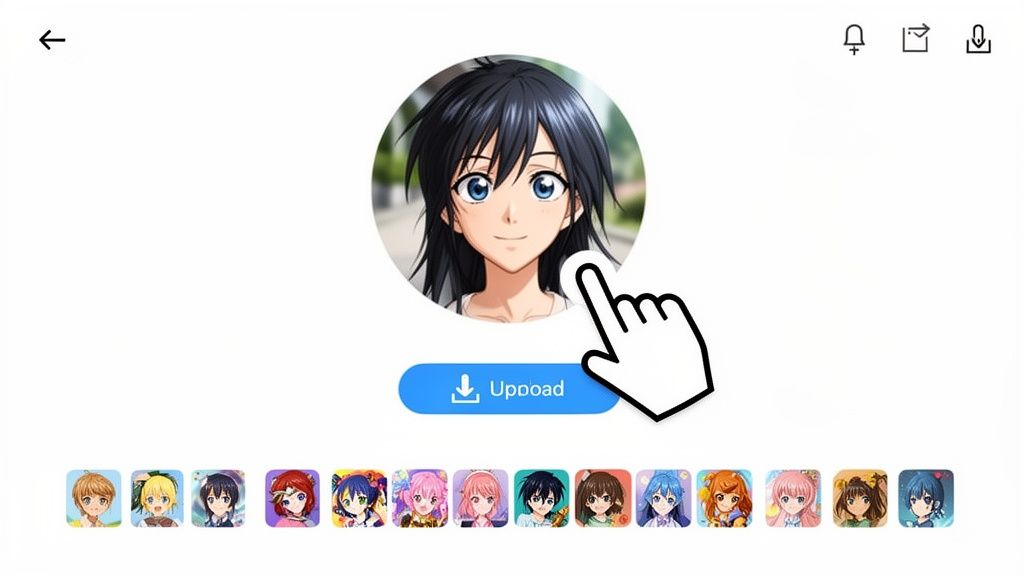
First things first, you need to get your picture into the system. The homepage keeps it simple with a big "Upload Image" button and a drag-and-drop area. No confusing menus, no complex settings to fiddle with—just get your photo in there and let the magic begin.
Finding Your Perfect Anime Style
This is the fun part. Once your photo is uploaded, you’re presented with twelve different anime styles. Each one completely changes the feel of your image, so it’s worth taking a second to see what’s available.
To give you an idea of the range you're working with, here are a few of my go-to options:
- Chibi: If you want something cute and playful, this is your style. It creates that classic big-head, big-eyes look that's super charming.
- Manga Black & White: For a more dramatic, graphic-novel vibe, this is perfect. It gives you bold, high-contrast lines that feel like they're straight out of a printed manga.
- Cel-Shaded: This one is a great all-rounder. It produces the clean, vibrant look you see in a lot of modern anime shows, with flat colors and crisp outlines.
The real power here is in experimentation. The same photo can go from looking like a serious hero to a goofy sidekick just by switching the style. Don't be afraid to try a few out.
Letting the AI Work Its Magic
After you’ve picked a style, the AI takes over. It’s surprisingly quick—we’re talking just a few seconds. The tool isn't just slapping a filter on your picture. Instead, it’s analyzing your face, hair, and expression and then completely redrawing them in the new art style.
The AI was trained on a massive library of anime art, which is how it knows the specific visual rules for each look. This is why the final image looks like a genuine illustration, not just a cheap photo effect. If you're curious about the costs, AnimePhoto.ai uses a one-time credit pricing system that you can check out on their pricing page.
Downloading Your New Avatar
Once the process finishes, your new anime portrait pops up. A simple download button lets you save the high-quality file right to your computer or phone. No watermarks, no hoops to jump through.
The final image is ready to go and works perfectly for things like:
- Social media profiles on Instagram, X, or TikTok
- Gaming avatars for Discord, Steam, or Twitch
- Personal stuff like custom stickers or phone backgrounds
From start to finish, the goal is to make changing a photo into a cartoon as easy as possible. You don't need any special skills to walk away with a polished piece of art that you can start using right away.
How to Choose the Perfect Photo for AI Transformation
The secret to a fantastic cartoon version of yourself isn't just about the AI style you pick—it all starts with the photo you feed it. Think of it this way: the AI is an artist, and you're giving it a reference. A blurry, poorly lit picture will almost always give you a muddy, disappointing result when you're changing a photo into a cartoon.
To get a result you'll love on the first try, you just need to keep an eye on a few key things. It really boils down to good lighting, a clear pose, and a simple background. Nail these, and the quality of your final anime image will skyrocket.
Nail Your Lighting
Honestly, lighting is probably the single most important part. The AI needs to clearly see the shapes and contours of your face to translate them into a cartoon style. If you're standing in harsh, direct sunlight, you'll get deep shadows and blown-out highlights, which can totally confuse the AI and create weird-looking spots on your final image.
What you want is soft, even light. It's easier to get than you think:
- Face a window. The natural light coming through a window is beautifully diffused and super flattering.
- Shoot on a cloudy day. Overcast skies act like a giant, free softbox, getting rid of any harsh shadows.
- Use a ring light. If you're inside without good natural light, a simple ring light gives you that consistent, even glow.
Try to avoid photos taken in a dark room or with a really strong light behind you (like standing with your back to a bright window). These situations hide the very facial details the AI needs to do its job well.
Focus on a Clear Pose and Expression
Your pose and expression are what give your final cartoon its personality. Since the AI is essentially redrawing you from scratch, it needs clear visual information to work with. A photo where your face is half-covered by your hair, your hand, or a deep shadow just won't convert as well.
Make sure your main features—your eyes, nose, and mouth—are easy to see. A real smile or even a thoughtful look will translate into a much more interesting and engaging cartoon than a blank, passport-style stare. These AI tools are surprisingly good at capturing emotion, so give them something to work with!
Pro Tip: I always recommend cropping your photo to a head-and-shoulders shot. When you upload a full-body picture taken from far away, the AI struggles to pick up on the crucial facial details. A tighter crop puts the focus right where it needs to be.
Keep the Background Simple
A busy, cluttered background is the enemy of a clean conversion. If you're in a crowded room with a dozen things going on behind you, the AI can get confused about what's you and what's the background. This can mess with the outlines and colors of your cartoon self.
For the best results, go for a photo with a simple or out-of-focus background. It helps the AI immediately identify you as the subject.
Before you hit that upload button, it's worth running through a quick mental check. I've put together a little table to help you pick the perfect shot every time.
Photo Selection Checklist For Best Cartoon Results
Use this checklist to evaluate your photo before uploading it to an AI cartoon generator to ensure the highest quality output.
| Photo Characteristic | What to Look For | What to Avoid |
|---|---|---|
| Lighting | Soft, even light hitting your face from the front. | Harsh shadows, strong backlighting, or dim, murky rooms. |
| Focus | Your face is in sharp, clear focus. | Blurry or out-of-focus images. |
| Composition | A classic head-and-shoulders crop. Your face is unobstructed. | Distant full-body shots. Hair, hands, or objects covering the face. |
| Background | Simple, plain, or nicely blurred backgrounds. | Cluttered, busy environments that distract from the subject. |
Taking a minute to choose the right photo makes all the difference. A great starting image is the foundation for an amazing AI-generated cartoon that you’ll actually be excited to use and share.
Finding the Right Anime Style for Your Vibe
Alright, you've uploaded your photo. Now for the fun part—choosing a style that completely transforms its personality. This isn't just a filter; it's about picking an aesthetic that truly matches the vibe you're going for.
Think of it like this: each style is a different artistic lens. A bright, sunny picture from your last beach trip would look incredible with a vibrant Cel-Shaded effect, giving it that classic, high-energy anime look. But what about a moody shot of you on a rainy city street? A darker, more atmospheric style like Horror could amplify that feeling in a really cool way.
Matching Styles to Your Photo’s Mood
Let's break down some options to help you get a feel for what works best. There are no hard-and-fast rules here, but understanding these aesthetics is key when changing a photo into a cartoon.
- For a Dreamy Look: Got a photo with soft, gentle lighting? Styles like Fantasy or Semi-Realistic are your best friends. They introduce a magical, almost painterly quality that’s perfect for creating something ethereal.
- For an Edgy Feel: If your photo has more of an urban, street-style attitude, you can't go wrong with Cyberpunk. It injects those futuristic, neon details that turn a simple portrait into something straight out of a sci-fi movie.
- For Playful Charm: The Chibi style is perfect for more casual, fun photos. With its oversized heads and cute features, it's a go-to for making adorable avatars for social media or your gaming profile.
If you're aiming for something nostalgic and relaxed, the popular Lofi aesthetic, with its deep roots in anime, might be the perfect fit. The whole idea is to consider the emotion your original photo already has and then pick a style that either enhances it or provides an interesting contrast. A great way to get ideas is by exploring different style categories and tags to see what jumps out at you.
This simple decision tree can help you gut-check your photo before you even start thinking about styles.
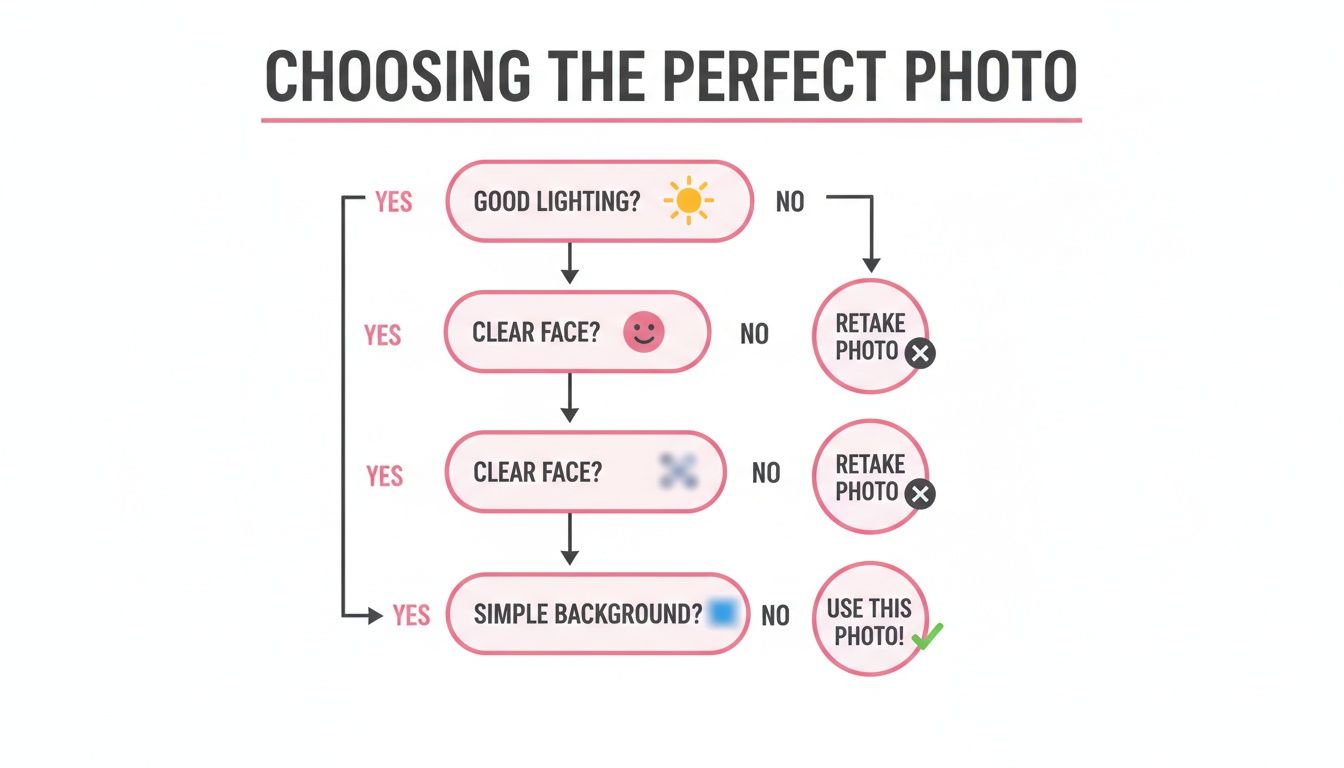
When you start with a solid foundation—good lighting, a clear face, and a clean background—any style you choose has a much better chance of looking fantastic.
Seeing the Subtle Differences
The choice of AI cartooning tools has exploded, but speed and quality vary wildly. Some platforms really stand out. From my experience testing these tools, some can offer over 40 distinct styles and process your image in under 5 seconds.
In fact, the best ones I’ve used average around 4 seconds for most conversions, which is a huge deal when you’re trying out different looks. In a recent review of over 30 different tools, I found that static image generation times fell anywhere between 3-10 seconds. Having a fast, watermark-free option is a game-changer for anyone who needs high-quality results without the hassle.
The best way to get a feel for this is to just play around. Pick one photo and run it through three completely different styles. You’ll be amazed at how much the linework, the color palette, and the entire mood shifts with each one.
This kind of hands-on experimentation is what it’s all about. It’s how you go from just clicking a button to actively creating a piece of art that really feels like you. You'll quickly start picking up on the subtle details that make each style unique, and that knowledge will help you make a more confident, creative choice next time.
Creative Ways to Use Your New Cartoon Avatar

Alright, so you’ve turned your photo into a pretty slick cartoon, and you've got this awesome new portrait ready to go. The first thing everyone does is update their profile picture, and you should too! But don't stop there. Your new avatar has a ton of potential beyond just social media.
Think of it as your own personal piece of digital art. It’s perfect for creating custom physical items that stand out. Imagine sipping coffee from a mug with your cartoon face on it—that's a great conversation starter. Or what about some custom laptop stickers to give your gear some personality? It's these little things that make your stuff feel truly yours.
For Friends and Groups
Here’s where it gets really fun: get your whole friend group or gaming squad on board. Have everyone convert their photos using the same anime style. Suddenly, you've got a killer set of matching avatars for your Discord server or WhatsApp group chat. It’s a simple way to build a unified team vibe and show off your group's identity.
The real magic happens when you bring your digital creation into the physical world. A custom t-shirt or a framed print of your cartoon self can be a fantastic conversation starter or a genuinely heartfelt gift for someone you care about.
This isn't just for fun, either. Businesses are catching on. Using a photo-to-cartoon AI is becoming a go-to trick in marketing for creating consistent brand mascots. What used to take a graphic designer weeks can now be done in seconds, often saving up to 80% on design costs. And because modern tools like CapCut's AI cartoonizer create high-definition images, you don't have to worry about the blurry, low-quality results you got from older AI. They're sharp enough for ads, social media thumbnails, and more.
Level Up Your Online Presence
If you're a content creator, your cartoon avatar can become a cornerstone of your brand. It’s the perfect mascot for your YouTube channel, a consistent visual for your social media banners, or even a custom emoji for your Twitch or Discord community.
Here are a few more ideas to get the wheels turning:
- Custom Phone Case: Slap your avatar on a phone case for an accessory that’s 100% you.
- Email Signature: It adds a professional yet personal flair to your emails, making them more memorable.
- Business Cards: If you’re a streamer, artist, or freelancer, it's a fantastic alternative to a boring headshot.
Don't just let that amazing portrait gather digital dust in a folder. Play around with these ideas and see just how many creative ways you can bring your new cartoon self to life.
Common Questions About AI Cartoon Generators
Jumping into the world of AI art is a blast, but it's totally normal to have a few questions. When you’re changing a photo into a cartoon, especially a personal one, you want to know you're in good hands. Let's walk through some of the things people often ask.
Is It Safe to Upload My Photos?
This is probably the biggest question on everyone's mind. With AnimePhoto.ai, your privacy is a top priority. Your photos are uploaded securely and are only visible to you. They aren’t being thrown into a public gallery, so you can feel confident turning your favorite memories into art.
What if I Don’t Like the First Result?
It happens! Art is subjective, and sometimes the first try doesn't quite capture the look you were going for. But don't get discouraged—this is where the fun part of the creative process begins. A less-than-perfect result is rarely a dead end.
Most of the time, the fix is surprisingly simple:
- Try a different photo. Remember what we talked about earlier? Good lighting, a clear subject, and a simple background can make a world of difference. Swapping a shadowy indoor shot for one taken in bright, natural light often works wonders.
- Experiment with another style. A photo that feels a little "off" in the Semi-Realistic style might look incredible as a Chibi or pop in Manga Black & White. Each style’s algorithm interprets your features in a unique way, so toggling between them is the best way to find a perfect match.
Think of an initial result you don't love as a creative nudge, not a failure. A small tweak to your source photo or a quick style change is usually all it takes to nail the look you're after.
How Does Payment Work? Any Hidden Fees?
Nobody likes surprise charges or confusing subscriptions. AnimePhoto.ai sidesteps all of that with a straightforward credit system. You just buy a pack of credits and use them whenever you want to create an image.
That’s it. There are no recurring subscription fees to worry about. This pay-as-you-go approach is transparent and keeps you in complete control of your spending.
If you're curious about how artificial intelligence is being used for other creative tasks, you might find it interesting to check out some of the other popular AI content generators available today.
Ready to see yourself as a cartoon? With AnimePhoto.ai, you can start changing a photo into a cartoon in just a few seconds. Give it a try and see what you can create!
https://animephoto.ai

See yourself in anime style in under a minute
Pick a style, upload a photo, and get a high-quality anime portrait ready for profiles, prints and gifts.
Create your anime photo

