
Take a quick scroll through Instagram, Discord, or even LinkedIn, and you'll see them everywhere: vibrant, unique anime-style profile pictures. This isn't just some niche trend anymore. People are using an anime avatar maker online to create a digital version of themselves that feels more expressive and personal than a standard photo.
So, Why Is Everyone Turning Themselves Into Anime Characters?
It seems like overnight, friends, streamers, and even professionals started swapping their headshots for anime avatars. This isn't just about loving anime (though that's a big part of it). It's really about crafting a digital identity that stands out and says something about who you are.
Think about it: an anime avatar can instantly communicate your vibe. Are you adventurous? Mysterious? Fun-loving? You can convey all that with a single image, making it the perfect tool for building a personal brand, whether you're in a gaming lobby or a professional Slack channel.
The Freedom of a New Online Persona
Creating an anime version of yourself is a chance to hit the refresh button on your online presence. A standard photo is just... you. But an avatar lets you dial up certain parts of your personality that a camera can't always capture.
This is a game-changer for platforms where your visual identity is everything:
- Gaming: Forget default skins. A custom avatar that reflects your in-game persona helps you stand out in any multiplayer match.
- Social Media: Give your profiles on Instagram, TikTok, and Discord a cohesive, memorable look that people will instantly recognize.
- Streaming: On platforms like Twitch or YouTube, a unique avatar is a core part of your brand and helps you connect with your audience on a deeper level.
An avatar is your digital handshake. It’s the first impression you make in an online community, telling people about your style and what you're into before you even type a word.
Anime's Global Takeover and Easy-to-Use AI
Let's be real, the influence of anime is massive and still growing. The industry is booming, with some projections valuing it anywhere from USD 27.1 billion to USD 89.77 billion by 2025. This worldwide love for the art style is what's driving the demand for cool digital tools like avatar makers.
What used to take an artist hours of painstaking work in Photoshop can now be done in a few clicks, thanks to modern AI. These tools have thrown the doors wide open, letting anyone create professional-looking art that fits their personal taste. If you need some ideas, you can find a ton of inspiration right here: https://animephoto.ai/blog/best-anime-profile-pictures.
At the end of the day, using an anime avatar maker online is all about having fun and being creative. It’s a cool way to join a global community, show off your appreciation for the art, and build an online identity that’s 100% you.
How to Choose the Perfect Photo for Your Avatar

The secret to a stunning final image from an anime avatar maker online isn’t some hidden trick—it’s all about the photo you start with. An AI generator is an incredible tool, but it's only as good as the information it's given. Think of it this way: garbage in, garbage out. A great photo gives the AI a perfect blueprint to build from.
That blurry, dimly lit selfie from last night? It’s probably not going to give you the crisp, vibrant anime character you have in mind. The AI will likely struggle to make out your facial features, leaving you with something muddy or generic. On the other hand, a clear, well-lit photo provides all the data it needs to capture your likeness beautifully.
Lighting Is Your Best Friend
If you only remember one thing, make it this: lighting is everything. You're looking for soft, even light that illuminates your whole face without creating any harsh shadows. The easiest and best way to get this is with natural light.
Try standing near a window on a slightly overcast day, or find a nice spot in the shade outdoors. This kind of light diffuses naturally, which smooths out your features and gets rid of those deep shadows under your eyes or nose that can confuse the AI. You'll want to avoid direct, harsh sunlight, which makes you squint and creates unflattering hot spots.
- Good Lighting Example: A photo taken while you're facing a window, so your face is evenly lit.
- Bad Lighting Example: A selfie taken at night under a single, bright ceiling light that casts strong shadows.
Your phone's camera flash is almost never a good idea. It creates a flat, washed-out look with harsh reflections and a dark background—pretty much the opposite of what you need for a high-quality avatar.
Focus on Your Face and Expression
To transform you, the AI needs to see you. Your photo should be a close-up or a medium shot where your face is the star of the show. Make sure your eyes, nose, and mouth are clearly visible and not hidden by hair, your hands, or accessories like sunglasses.
Your expression makes a huge difference, too. A neutral look is fine, but a subtle smile or a thoughtful expression can inject a lot of personality that translates really well into an anime style. Just try to avoid super exaggerated faces, as they sometimes don't convert as cleanly. The goal is a clear, natural look the AI can easily interpret.
For more ideas, take a look at our guide on the 8 best poses for selfies that are perfect for creating avatars.
Technical Details Made Simple
Finally, let's talk about the technical quality of the picture itself. Don't worry, you don't need a fancy professional camera. Any modern smartphone is more than up to the task.
Just keep these simple points in mind:
- Resolution: Always use a high-resolution photo. A grainy or pixelated image simply doesn't give the AI enough detail to play with.
- Focus: Your face should be in sharp focus. Before you snap the picture, just tap on your face on your phone's screen to make sure the camera locks in on you.
- Simplicity: A simple, uncluttered background is your best bet. It helps the AI focus entirely on you without getting distracted by a busy scene.
Finding the Right Anime Art Style for Your Personality
Alright, you've got your photos ready to go. Now comes the best part of using an anime avatar maker online: picking the art style. This is where you get to inject your personality into the final result. It's way more than just slapping on a filter; you're choosing a whole visual language that says something about you.
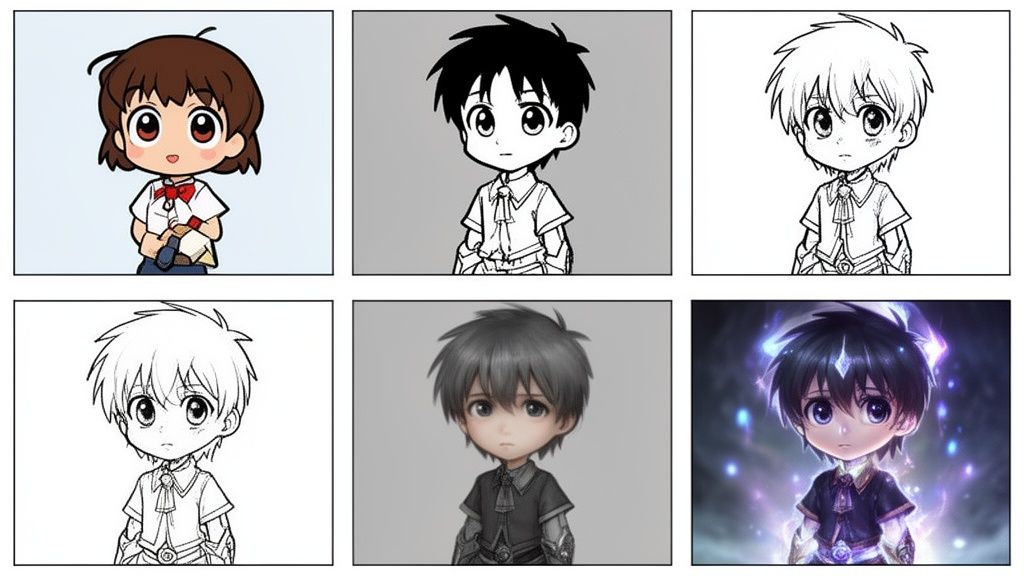
Think about the vibe you're aiming for. Do you want something cute and playful? Or are you going for a more serious, dramatic look? The style you land on sets the entire tone for your new digital self.
Matching a Style to Your Vibe
Just like people, different anime styles have their own distinct personalities. A solid online generator will give you plenty of options, each with its own unique aesthetic. Getting a feel for these will help you find that perfect match.
To help you decide, here’s a quick breakdown of some of the most popular styles you’ll encounter and what they’re great for.
Choosing the Right Anime Style for Your Avatar
| Style Name | Key Characteristics | Best For |
|---|---|---|
| Classic Cel-Shaded | Clean lines, flat colors, and a distinct nostalgic feel reminiscent of 90s anime. | Fans of classic series, clean profile pictures, and a universally recognizable look. |
| Chibi | Adorable, with oversized heads, small bodies, and exaggerated expressions. | Lighthearted social media profiles, cute emotes, or a fun and playful online persona. |
| Manga Black-and-White | Bold, graphic linework with high contrast and screentones, mimicking printed manga panels. | Creating a dramatic, artistic, or intense avatar with a classic comic book feel. |
| Semi-Realistic | Blends traditional anime features with more realistic proportions, lighting, and shading. | Professional-yet-creative profiles (like LinkedIn), portfolios, or a more refined look. |
Ultimately, exploring these styles is part of the fun. You might find that a style you hadn't considered actually captures your personality perfectly.
Your avatar's style is a shortcut to your personality. A sleek cyberpunk avatar for a tech enthusiast or a whimsical fantasy portrait for a gamer instantly tells people what you're passionate about without saying a word.
Consider Where You'll Use Your Avatar
Think about where this avatar is going to live. The style that kills it on your Discord server might not fly as your professional email signature. Context is key.
A Semi-Realistic or clean Cel-Shaded style, for example, often works great in professional or semi-professional settings. They look artistic but still present a polished and clear image of you.
On the other hand, a wild Fantasy or edgy Horror style is perfect for gaming communities, forums, or themed social media accounts. These let you go all-in on a specific persona and express yourself more imaginatively. If you're curious about the tech that makes these styles possible, you can dive deeper into the best anime AI art generator tools available.
In the end, the best choice is the one that feels right to you. Don't hesitate to play around with a few different looks. You might be surprised which one feels the most like you.
Your Step-by-Step Guide to Creating an Avatar
Alright, you’ve got your photo picked out and a style in mind. Now for the fun part: actually making your anime avatar. I’ve used a bunch of these tools, and most, like the one we have here at AnimePhoto.ai, are designed to be incredibly simple. They turn what sounds like a complicated art project into a few clicks.
Let's break down the whole process, from the moment you upload your picture to when you're saving that final, perfect image.
Getting Your Photo in and Picking a Vibe
First things first, you need to upload your photo. You'll see a big, obvious button that says something like "Upload Photo" or "Get Started." Just click that and grab the high-quality picture you prepared earlier. The tool will then scan it to find all the important facial features it needs to work with.
With your photo loaded, you’ll see a gallery of different art styles. This is where your creativity comes in. Take a minute to scroll through the options. Are you feeling a Classic Cel-Shaded look, something cute like Chibi, or a dramatic Manga Black-and-White style? Just click the one that speaks to you. This choice tells the AI exactly what kind of look you're going for.
After you've made your pick, the AI gets to work. It only takes a few seconds, but in that time, it's completely redrawing your photo based on the rules of that art style. You won't just get one image back; most tools generate a whole batch of variations, so you have plenty to choose from.
Tweaking and Perfecting Your Creation
What happens if the first set of avatars doesn't quite hit the mark? Don't worry, that’s totally normal. I’ve had it happen plenty of times. Think of it less as a failure and more as the start of the creative process.
If you're not loving the results, here are a few things I always try:
- Try a different style. This is the most common fix. Maybe the Semi-Realistic style you chose feels a little bland. Why not try a bold Fantasy or Cyberpunk theme? A completely different style can often capture your personality in a way you didn't expect.
- Swap out the photo. Sometimes, the AI just gets hung up on something in the original picture—a weird shadow, a half-smile it doesn't know what to do with. Uploading another one of your prepped photos can often solve the problem instantly.
- Just generate another batch. Many tools let you re-roll the dice with the same photo and style. Since there’s a bit of randomness in how the AI works, a second or third attempt might just nail the look you were hoping for.
The real secret is just to play around with it. Every combination of photo and style is a unique experiment. Running a few different batches is the best way to see what’s possible and land on an avatar you're genuinely excited about.
Once you’ve found "the one," it's time to download it. Look for the download button and save your new masterpiece. I usually recommend saving as a PNG if you want a transparent background—perfect for making stickers or layering over other images. For everything else, like social media profiles, a standard JPEG works great.
And just like that, you're ready to share your new look with the world.
What To Do With Your New Anime Avatar
Alright, so you've just made a fantastic anime version of yourself. Don't let it just collect digital dust in your downloads folder! Your new avatar is way more than a simple profile picture; it's a fresh piece of your online identity.
Of course, the first logical step is to splash it across your social media and gaming profiles. A sharp, custom anime avatar gives your presence on platforms like Discord, Instagram, or Twitch an instant and memorable upgrade. But the real fun starts when you think beyond the obvious and get creative.
More Than Just a Profile Picture
The real magic of your new avatar is how it can visually represent you, your friendships, and even your hobbies. Instead of just a single static image, you can build out a whole gallery that tells a story.
Think about trying one of these projects:
- Matching Couple or Friend Avatars: This is a classic for a reason. Creating a matched set of avatars for you and your partner or best friend is a fun, modern way to show you're a duo. Perfect for shared accounts or just for fun.
- A Full Team Roster: Part of a gaming squad, a project team, or even a book club? Making a unique anime avatar for every member builds an awesome sense of camaraderie and makes your group look unified and professional.
- Adorable Pet Portraits: Don't forget your furry (or scaly) companions! Turning a photo of your cat or dog into an anime character is an incredibly charming way to show them off and get some one-of-a-kind art.
Starting any of these is simpler than you might think. The process is always the same.
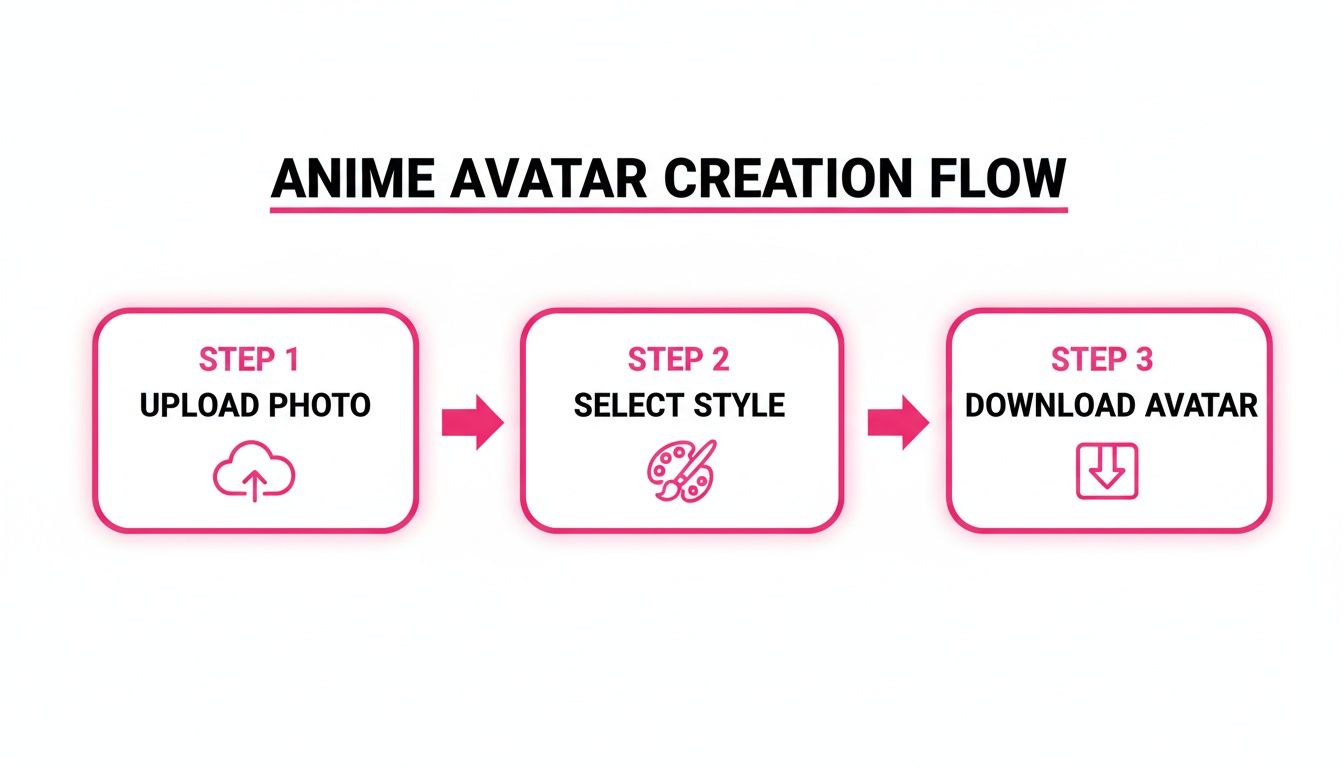
It really is just a few clicks to go from a regular photo to a finished anime avatar, ready for whatever creative idea you have in mind.
Personal Branding and Cool Merch
For content creators, streamers, or anyone building a personal brand, that new avatar can be a serious asset. It can literally become the face of your brand. As you brainstorm ideas, it’s worth checking out a good social media branding guide to make sure everything you do online feels consistent and makes an impact.
Think of your anime avatar as your digital signature. When you use it everywhere, you build recognition, and your audience starts to feel a real connection to your online persona.
This isn't just a niche trend. With the anime creation software market projected to capture a 22.3% market share by 2025, it's clear these tools are becoming a mainstream part of how we express ourselves online.
And why keep it all digital? Take your avatar into the real world.
- Custom Stickers: Slap 'em on your laptop, water bottle, or notebook.
- Personalized Emotes: Design totally unique emotes for your Twitch or Discord community.
- Unique Gifts: Print your avatar on a phone case, mug, or t-shirt. It makes for a gift that’s genuinely personal and can't be bought in a store.
These ideas turn a simple image into a dynamic part of your life, both on and off the screen.
A Quick Word on Privacy, Security, and Cost
Let's be real—uploading your personal photos to any website can feel a little risky. It's totally normal to wonder where your pictures are going and how they're being used. When you're using a trusted anime avatar maker online, your privacy should be a top priority for them, not just for you.
Their business is about one thing: turning your photo into a fantastic avatar. That's it. When you upload an image, it's sent over a secure connection, used by the AI as a creative reference, and then—this is the important part—it's deleted from their servers. Reputable services don't hang onto your personal photos. Before you upload anything, I always recommend taking a quick glance at their privacy policy. It’s usually linked in the footer of the website.
So, What's the Cost?
Nobody likes surprise subscription charges. Thankfully, most of the better avatar creation tools have moved away from that confusing model. Instead, you'll usually find a much more straightforward credit-based system.
It works like this: you buy a pack of credits upfront, and then you spend them to generate your avatars. This approach is way better for a few reasons:
- No Sneaky Recurring Fees: You buy a pack of credits, and that's the only time your card is charged. No monthly bills to forget about.
- You're in the Driver's Seat: You decide when to buy more credits. If you don't use the service for six months, you aren't paying for it.
- Try It Out or Go All In: You can grab a small, inexpensive pack to see if you like the results or buy a larger bundle to get a better deal for creating a whole set of avatars.
I'm a big fan of this pay-as-you-go model. It's completely transparent. You know exactly what you're spending and what you're getting, which makes the whole process feel fair and simple.
Common Questions About Making Anime Avatars
When you first start playing with an anime avatar maker online, you're bound to have a few questions. That's totally normal. Let's get those out of the way so you can focus on the fun part: getting creative.
Can I Make Avatars for Me and a Friend from the Same Photo?
This is a big one, and the answer is a definite yes. Today’s AI is smart enough to spot multiple faces in a single picture.
This means you can easily create matching avatars for you and your partner, or even turn a group photo with all your friends into a team of anime characters. Just upload one great shot, and the tool handles the rest.
What Happens to My Photos After I Upload Them?
It's smart to think about privacy. When you upload your pictures to a platform like ours, they have a single job: to be the source material for your new avatar.
The system processes them securely, and once the magic is done, the original images are not stored on our servers. We're serious about this. Your personal photos stay personal, giving you the peace of mind to create freely.
Do I Need to Be an Artist to Do This?
Not at all. And honestly, that’s the best part. You don't need to know how to draw, have any design background, or be a tech wizard. The whole process is built to be incredibly straightforward.
The platform does all the heavy lifting—the complex artistic work is handled for you. All you have to do is pick a photo you like and choose a style that speaks to you. It's a creative tool designed for everyone, no matter their skill level.
If you can upload a picture and click a button, you've got everything it takes to make a fantastic anime avatar.
Ready to see a new side of yourself? AnimePhoto.ai makes it fast, fun, and secure to create your perfect avatar.

See yourself in anime style in under a minute
Pick a style, upload a photo, and get a high-quality anime portrait ready for profiles, prints and gifts.
Create your anime photo

