Taking your own headshot is actually a lot simpler than most people think. It really just boils down to a few key things: finding some soft, natural light, picking a clean background, keeping your phone or camera steady, and capturing a genuine expression. If you can nail these basics, you'll end up with a high-quality, professional image without ever needing to book a photographer or buy fancy gear.
Why a Great Headshot Is Your Digital Handshake
In a world where almost every connection starts online, your headshot is your first impression. Think of it as your digital handshake—it’s the first thing people see on LinkedIn, your company’s website, or even your social media profiles. It's more than just a picture; it’s a vital piece of your personal brand that tells people who you are before you’ve even said a word.
That first visual can totally shape how a potential client, employer, or partner sees you. A blurry selfie or an old, cropped photo from a party might scream "unprofessional," while a clean, authentic headshot immediately builds a sense of trust and credibility. The goal is simple: show up as someone who is both professional and approachable.
The Power of a DIY Headshot
The best part about learning to take your own headshot is that you get total control over how you’re perceived. You get to decide the tone, the style, and the exact expression that truly represents you. This isn't just about saving a few bucks; it’s about taking charge of a critical career tool and crafting it on your own terms.
This move toward self-managed professional photos is part of a much bigger trend. With personal branding being so important these days, the market for professional headshot services has grown significantly. Everyone's realizing how much value a great photo holds.
Your headshot is working for you 24/7. It introduces you when you're not in the room, making it one of the most important assets for managing your professional identity online.
At the end of the day, an effective DIY headshot proves that a clear vision and a little resourcefulness can be far more powerful than a big budget. It doesn't just show what you look like—it shows your commitment to presenting your best self.
And if you're looking to personalize your online presence even more, our guide on choosing the https://animephoto.ai/blog/best-discord-profile-pictures has some great ideas for digital self-expression.
Getting Ready for Your DIY Headshot
The real secret to a killer headshot isn't the camera—it's the prep work. Honestly, what you do before you even think about hitting the shutter button makes all the difference. Think of it like a chef prepping ingredients; you need to get your story, your look, and your environment sorted out first. This is where you decide the exact message you want to send.
So, start with the big question: who am I taking this headshot for? A headshot for your buttoned-up LinkedIn profile is going to have a completely different vibe than one for your creative portfolio. Are you going for "authoritative and trustworthy" or "approachable and innovative"? Nailing this down is the first step to taking a headshot that truly works for you.
Nailing Your Wardrobe and Grooming
Once you know the story you want to tell, picking an outfit is a hundred times easier. Solid colors are your best friend here—they keep the focus squarely on you, where it belongs. I’ve found that jewel tones like deep blue, emerald green, and rich burgundy are flattering on almost everyone.
Steer clear of busy patterns, big logos, or anything super trendy. Those things can make a photo look dated almost overnight. Your goal is timeless professionalism. And it might sound obvious, but make sure your clothes are clean and wrinkle-free. You'd be surprised how much those little details pop on camera.
Pro Tip: Your clothes should complement you, not compete with you for attention. Go for a simple, well-fitting top in a solid color that makes you feel confident.
When it comes to grooming, think "polished version of you." This isn't the time to experiment with a wild new haircut or bold makeup you wouldn't normally wear. A clean, natural presentation ensures your headshot feels authentic and genuinely represents you.
Choosing a Background That Enhances, Not Distracts
Your background is more than just what’s behind you; it sets the entire mood of the photo. Don't let it be an afterthought. The easiest and often most effective choice is a simple, clutter-free wall. A light gray, off-white, or even a clean white wall gives you a professional look without any extra effort.
If you want something with a bit more character, look for a spot with interesting but not distracting texture. An exposed brick wall or a tidy, color-coordinated bookshelf can add some personality. The trick is to create depth without pulling the viewer's eye away from your face. A great way to do this is to stand a few feet in front of your background—this will naturally create a subtle blur, making the shot look much more professional.
To make things even simpler, here’s a quick guide to help you pick the perfect outfit.
Wardrobe Choices for a Winning Headshot
This table is your quick reference guide for choosing an outfit that works for you, not against you.
| Do Wear (Best Choices) | Why It Works | Don't Wear (Avoid) | Why It Distracts |
|---|---|---|---|
| Solid, rich colors | Draws attention to your face and adds vibrancy. | Busy patterns or logos | Pulls the viewer's eye away from you. |
| Well-fitting tops | Creates a clean, professional silhouette. | Baggy or ill-fitting clothes | Can look unprofessional and sloppy. |
| Simple jewelry | Adds a touch of personality without overwhelming. | Large, flashy accessories | Can create glare and become the focal point. |
| Layered pieces | A blazer or cardigan can add depth and structure. | Pure white or black tops | Can lose detail and affect camera exposure. |
Ultimately, the best wardrobe choice is one that feels like you and aligns with the professional image you want to project. Comfort and confidence are key
Setting Up Your Camera and Lighting Like a Pro
Alright, with your wardrobe picked out and your background sorted, it's time to get into the nuts and bolts of the actual shot. Don't stress if you don't have a pro studio—you absolutely don't need one. The two things that truly matter are good light and a steady camera, and both are surprisingly easy to nail at home.
Great lighting is the secret ingredient. Seriously, it can make or break your headshot. The best light source you can find is totally free: a big window on a day with some light cloud cover. This gives you soft, diffused light that’s incredibly flattering, erasing harsh shadows and giving your skin a natural, even glow.
Get set up so you are facing the window directly. This lets the light hit your face evenly, defining your features without creating any weird, distracting shadows. Play around with your distance from the window—moving closer or farther away will change the light's intensity and feel.
Mastering DIY Lighting Setups
What if it's a dark day or you're shooting at night? No problem at all. You can easily rig up a fantastic lighting setup with a lamp you probably already have. The goal is to soften the light. You want to avoid that harsh, direct beam from a bare bulb, which creates sharp, unflattering shadows.
Here’s my go-to method for creating a DIY softbox:
- Grab a lamp: Any table or floor lamp where you can take the shade off will do the trick.
- Diffuse the light: Drape a thin white bedsheet or even a piece of parchment paper over the lamp (be careful with heat!). This instantly turns that harsh glare into soft, beautiful light.
- Get the position right: Place your new "softbox" a few feet away, slightly off to one side, and just above your eye level. This is a classic portrait lighting technique that adds a nice touch of dimension to your face.
This quick visual guide breaks down the prep work you should do before you even think about hitting the shutter button.
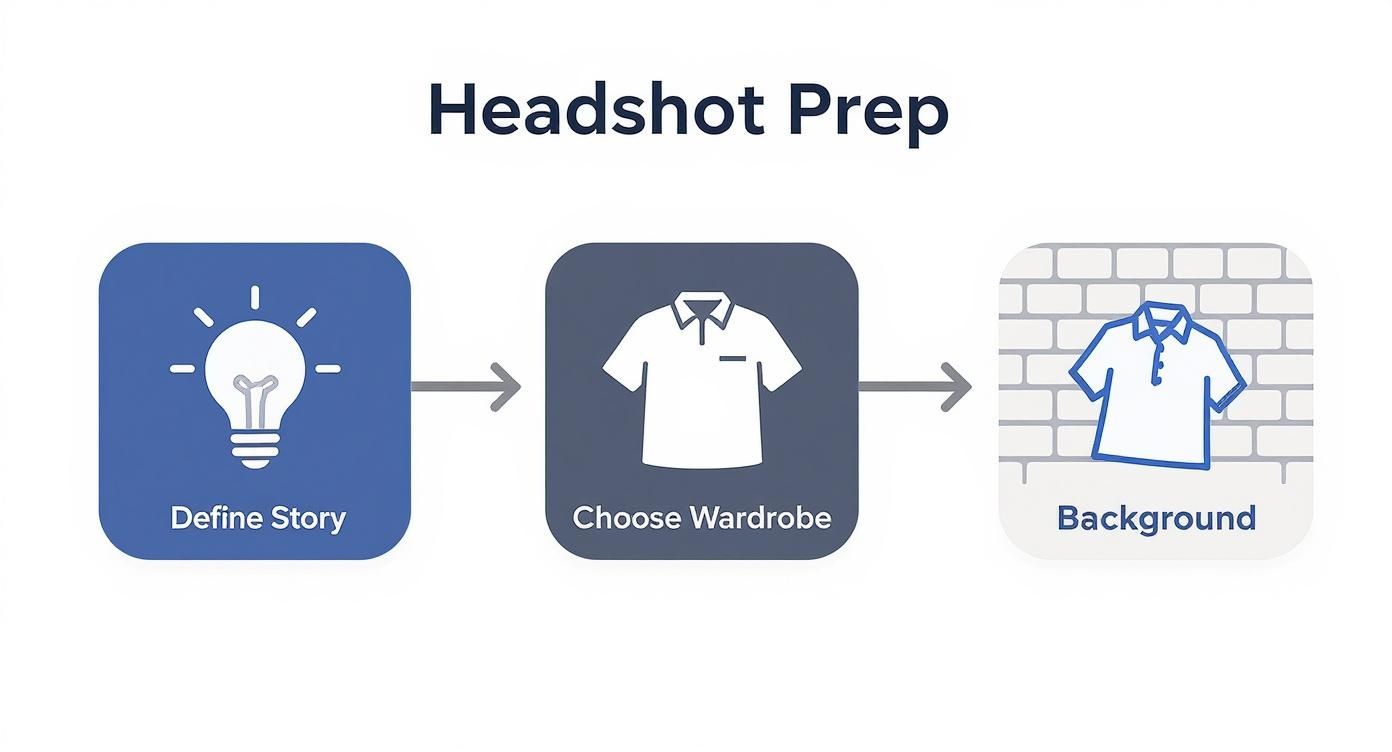
As you can see, figuring out your story, wardrobe, and background first gives you a solid foundation for a successful shoot.
Stabilizing Your Camera for Sharp Results
Nothing screams "I took this myself" more than a blurry photo. To get that crisp, professional look, your camera needs to be rock-solid. A tripod is the obvious choice, but you can get the same result without one. Just stack up some books on a table or use a sturdy shelf to get your camera to the perfect eye-level height.
A stable camera is non-negotiable. The tiniest shake when you take the picture can lead to a soft, amateurish image. Your best bet is to use the camera’s self-timer or a cheap Bluetooth remote to avoid the camera shake that comes from physically pressing the button.
Using a remote also frees you up to concentrate on your pose and expression without that mad dash to get back in place. It's a small change that makes a massive difference in how natural your final shots feel.
Jargon-Free Camera Settings
Last but not least, let's talk settings. Whether you're on a smartphone or a "real" camera, a couple of quick tweaks will take your photo from a simple snapshot to a professional headshot.
For Smartphone Users:
- Portrait Mode: This is your best friend. It automatically creates that lovely blurred background, making you pop right out of the frame.
- Lock Focus and Exposure: On your screen, tap and hold on your face until you see a little box appear (usually yellow). This locks in the focus and brightness, so your face stays perfectly sharp and well-lit, even if you shift a bit.
For DSLR or Mirrorless Users:
- Aperture: To get that beautifully blurred background (the technical term is bokeh), set your aperture to a low f-number, something like f/2.8 or f/4.
- ISO: Keep your ISO as low as it will go—100 or 200 is ideal. This prevents your image from looking grainy. You should only raise it if you’re struggling for light.
- Shutter Speed: Aim for a shutter speed of at least 1/125s. This is fast enough to freeze any minor movements you might make, keeping the shot perfectly sharp.
Finding Your Most Confident and Authentic Pose
Let's be honest, most of us freeze up the second a camera is pointed our way. That sudden stiffness is the biggest hurdle to getting a photo that actually looks and feels like you. The good news is that learning how to take your own headshot is less about being a model and more about being a great self-director.
The goal here isn’t some high-fashion pose. It's about finding a comfortable stance that projects confidence and makes you look approachable. One of the simplest tricks in a photographer's playbook is to avoid facing the camera dead-on, which can often look a little too much like a mugshot.
Try this instead: angle your body about 45 degrees away from the camera, then just turn your head back to look at the lens. It's a tiny shift, but it instantly creates more dimension and a far more flattering line. You'd be surprised what a difference this one small adjustment makes.
Nailing the Natural Expression
Once your body is angled, it's time to think about your expression. This is where the real you comes through. A plastered-on, forced smile is a dead giveaway and can cheapen an otherwise professional shot. The real secret? Think of something that actually makes you smile.
It could be a recent win at work, a funny thing your friend said, or just thinking about your favorite pet. When you let a genuine feeling wash over you, you get a real, subtle smile on your lips and—most importantly—in your eyes. This is what photographers call a "Duchenne smile," and it's seen as authentic because it engages the muscles around your eyes.
Here are a few other pro tips to try in front of the mirror:
- The Turtle: Gently push your chin forward (like a turtle peeking out of its shell) and then tilt it slightly down. It feels incredibly weird, but it's magic for defining your jawline and getting rid of any hint of a double chin.
- The Squinch: Don't go for a wide-eyed, deer-in-the-headlights look. Instead, slightly squint by raising your lower eyelids just a touch. It gives you a look of confidence and focus.
- The Exhale: Right before the timer goes off, take a deep breath in and slowly let it out as the picture is taken. This simple action relaxes your shoulders and facial muscles, melting away any tension.
A great headshot captures your personality, not just your appearance. The best poses feel natural and comfortable, allowing your authentic self to shine through without any forced stiffness.
This drive for authenticity is a big reason why self-taken and AI-assisted headshots are becoming so popular. New tech lets people fine-tune things like facial expressions to get professional results without the hassle and cost of a studio session. You can explore more about how these AI headshot trends are reshaping professional photography and giving people more control.
To get even more ideas, check out these game-changing dating profile photo tips. While they're meant for a different context, the core advice on looking confident and approachable is universal. Just remember to take a ton of shots, play around with these techniques, and see what feels most like you.
Polishing Your Headshot: The Final Edit

You've got the shot. Now it's time for the final, crucial step: the edit. This is where you take a good photo and make it truly great with a few simple, strategic tweaks. Don't worry, you don't need to be a Photoshop wizard or buy expensive software. Free mobile apps like Snapseed or the free version of Adobe Lightroom are more than powerful enough for the job.
The secret to a great edit is to enhance, not alter. You’re aiming for subtle adjustments that bring out the best in the photo you already have. Think of it as polishing, not rebuilding. The main things to focus on are the basics: brightness, contrast, and color. A little boost in brightness can make the whole image feel more professional and inviting, while a touch of contrast will help you pop right out of the background.
Mastering Simple Edits
First, let's look at exposure and contrast. Is the photo a bit too dark? Gently slide up the brightness until your face is well-lit, but be careful not to blow out the highlights or look washed out. Once that’s set, add just a tiny bit of contrast to make the details sharper.
Next up is color. Photos taken inside often pick up a slight yellow or blue cast from the lighting. You can fix this easily with the "White Balance" or "Temperature" slider. The goal is simple: make your skin tone look natural and true-to-life. A common mistake is cranking up the saturation, but this usually just looks artificial. Keep it subtle.
A light touch is everything. The best editing is invisible. Aim for small, incremental changes that, when combined, create a polished and professional final image.
Learning these simple skills is a huge money-saver. With professional photographers charging more than ever, it's no wonder people are looking for great DIY and AI alternatives. For context, the average cost for a professional headshot session in 2025 starts at around $283. You can dig deeper into the rising costs of professional headshots on studioshot.ai.
Cropping and Exporting for Maximum Impact
Your final touch is the crop. This is your chance to perfect the composition and really draw the viewer's eye. The classic "head and shoulders" shot is a standard for a reason—it’s clean, balanced, and keeps the focus entirely on you.
When you're cropping, think about where the photo will be used. Platforms like LinkedIn use a circular frame, so make sure your face is nicely centered and won't get awkwardly cut off.
Once you’re happy with the final look, it's time to save it. For almost any online use—from social media to your email signature—a JPEG (.jpg) file is the universal standard.
Export Settings Checklist:
- File Type: JPEG (.jpg)
- Quality: Aim for a high setting, somewhere around 80-90% is perfect.
- Resolution: To ensure your photo looks crisp on any screen, save it at a resolution of at least 1024 x 1024 pixels.
Following these settings will ensure your new headshot looks sharp and professional everywhere you upload it. And if you're looking to get a bit more creative with your profile picture, check out our guide on how to create a unique avatar with a free anime avatar maker.
Common Questions About DIY Headshots
Jumping into the world of DIY headshots is a great move, but it’s totally normal to have a few questions pop up. Am I doing this right? Will this even look good? Let's tackle some of the most common concerns I hear so you can get started with total confidence.
Trust me, getting a fantastic result is less about having a fancy, expensive camera and more about nailing a few key fundamentals. With the right approach, you can absolutely capture a professional-looking shot right from home that stands up to studio quality.
Can I Really Use My Smartphone?
You bet. The camera you carry around every day is probably way more powerful than you give it credit for. Most modern smartphones, especially with tools like Portrait Mode, are built to take incredibly sharp photos with that soft, blurred background everyone loves.
Success really comes down to mastering the basics, not the brand of your gear. Pour your energy into finding great light, picking a clean background, and making sure your phone is rock-steady. If you get those three things right, your phone is more than capable of producing a top-notch headshot.
The most expensive camera in the world will produce a bad headshot in poor lighting. Conversely, a smartphone in perfect, soft light can produce a brilliant one. Light and composition are your two most important tools.
What Are the Biggest Mistakes to Avoid?
When you're figuring out how to take your own headshot, a few common slip-ups can instantly make a good photo look amateur. Just knowing what they are is half the battle.
The three big ones I see all the time are unflattering light, a busy background, and an awkward pose. Harsh light from directly overhead or in bright, direct sun creates harsh, ugly shadows across your face. You always want to find soft, diffused light—think of the light coming through a window on an overcast day.
A cluttered background is another killer because it yanks the focus away from you. Keep it simple. A plain, neutral-colored wall or a clean, simple setting is all you need. Lastly, facing the camera head-on can look a little stiff, almost like a mugshot. Try angling your body just a bit and focus on a relaxed, genuine expression. It makes a world of difference and feels so much more dynamic and approachable.
How Should I Crop My Headshot?
The final crop is what really pulls everything together and frames you in a professional way. The go-to standard is a classic "head and shoulders" shot. This just means cropping the photo from around your mid-chest up to the top, leaving a little bit of breathing room above your head.
Here are a few pointers to get that crop just right:
- Mind the Circle: Most platforms like LinkedIn use a circular frame these days. When you're cropping, make sure your face is nicely centered so that no key features get lopped off.
- Don't Create a "Floating Head": Cropping too tightly around your face can look odd. Including your shoulders gives the photo context and makes the whole composition feel much more balanced.
- Start with a Square: A great rule of thumb is to start with a high-resolution square image. Aiming for 1024x1024 pixels is perfect, as it gives you plenty of flexibility to adjust the crop for different sites without losing any quality.
Getting the crop right makes your headshot look polished and intentional, no matter where you use it. For those looking into modern twists on the DIY process, you can learn how to take your own headshots instantly with AI. And while you're crafting your personal brand, you might get some inspiration from our guide on the https://animephoto.ai/blog/best-anime-profile-pictures for other creative profile ideas.
Ready to take your new photos to the next level? With AnimePhoto.ai, you can transform that awesome new headshot into a unique anime-style portrait in just a few seconds. It’s a fun way to create a standout avatar for social media, gaming profiles, or just to see yourself in a new way. Give it a try and see your photo in a whole new light at https://animephoto.ai.

See yourself in anime style in under a minute
Pick a style, upload a photo, and get a high-quality anime portrait ready for profiles, prints and gifts.
Create your anime photo

